

Most families prep for a guest the same way every time: a frantic text with the door code, a half‑remembered explanation of how the thermostat works, and a silent prayer that nobody leaves the garage open for three days. It works until it doesn't. Then you're fielding a call at 11pm because the Wi‑Fi password changed, or you come home to a guest who somehow still has the code two weeks after they left.
The fix isn't a cleaner house. It's treating every stay as a short access lifecycle: access gets issued, becomes active, then expires — with clear rules at each stage. That framing changes everything, because it forces you to answer the questions that actually cause problems. When does the code work? When does it stop? Who handles the dog? What happens the hour after they leave?
This is a tighter, more operational cousin of broader household access governance — but scoped specifically to guests and short stays, where the handoff is personal and the timeline is short.
The three states every guest stay actually moves through
Think of a guest stay as having three phases, each with its own job.
Issue is everything before the guest arrives — the packet, the code, the checklist you run. Active is the window they're actually in your home and things need to work. Expiry is the part everyone forgets: shutting access off and resetting the house.
Stays go sideways because families only prep the Issue phase. They make the bed and text the code, then mentally file the whole thing as done. But the Active phase has its own failure points, and the Expiry phase has almost no process at all. A code that never gets rotated. A pet instruction that lived only in someone's head. A spare key that's now floating around unaccounted for.
Here's the pattern across stays that go smoothly versus the ones that don't:
| Phase | What breaks when there's no process | What a process looks like |
|---|---|---|
| Issue | Guest arrives, code doesn't work, you're not home | Packet sent 48h ahead, code tested, checklist run |
| Active | "How does the oven work?" texts, pet confusion | Printable packet in the house, named owner for each handoff |
| Expiry | Code still works days later, key unaccounted for | Access turns off on a set date, 30‑min recovery plan |
The households that stay sane built something for all three columns, not just the first.
Build the guest packet once — digital and printable
The single highest‑leverage thing you can make is a guest packet that exists in two forms: a digital version you send ahead, and a printed copy sitting on the counter when they arrive.
Stop losing track of household duties.
Famioly helps you organize, assign & complete family tasks efficiently.
- Centralized task management
- Shared family calendar
- Budget & expense tracking
No credit card required
Why both? Because they fail differently. The digital one is great for planning — the guest reads it on the drive over. But the moment they're standing in your kitchen with no signal, trying to figure out which remote turns on the TV, the printed copy is the one that saves you a phone call. A surprising number of "urgent" guest texts are just the digital packet being inaccessible at the exact moment it's needed.
Keep the packet short and operational. A good one covers:
-
Access the code, when it activates, when it expires, and what to do if it fails (a backup contact, not just "call me")
-
Wi‑Fi network name and password, written exactly, including capitalization
-
The three things people always ask thermostat, how to work the TV/sound, and where the trash/recycling goes out
-
Quirks the door that sticks, the burner that runs hot, the faucet that needs a second to warm up
-
Pet and plant handoffs feeding times, amounts, where the food is, vet number
-
Checkout exact time, what to do with keys/linens, and what you want left on or off
The mistake people make is writing the packet like a welcome letter — warm, wordy, and useless under pressure. Write it like a reference card. Short lines. Specifics over sentences. "Thermostat: set to 68, don't touch the schedule" beats a paragraph about how the heating works.
Issue → Active → Expiry: write the access rules down
This is what separates a real lifecycle from a nicer to‑do list. For every stay, you decide three dates and one fallback.
-
Issue date when the guest gets the packet and the code — usually 48 hours ahead, so there's time to fix a bad code before they're standing at your door.
-
Active window the exact span the code works. If they arrive Friday at 4pm and leave Sunday at 11am, the code should be live Friday morning and dead by Sunday afternoon — not indefinitely.
-
Expiry action what physically happens when the window closes. On a smart lock, the code auto‑disables. On a manual lock, you rotate it or collect the key. Either way, someone owns this step and it goes on a date.
The fallback is the fourth piece: if access fails during the active window, who's the backup person the guest calls? The homeowner is often the worst choice here because they might be the reason access needs fixing — traveling, phone off. A neighbor or nearby family member with a spare is far more reliable.
Expiry is consistently the step with no owner. Families are great at turning access on. Turning it off lives in nobody's job description, so codes pile up. One house had eleven active door codes and the owners could identify maybe four of them. That's not a security system — that's a permanent guest list of everyone who'd ever stayed.
A simple visual of the lifecycle helps everyone know who does what and when.
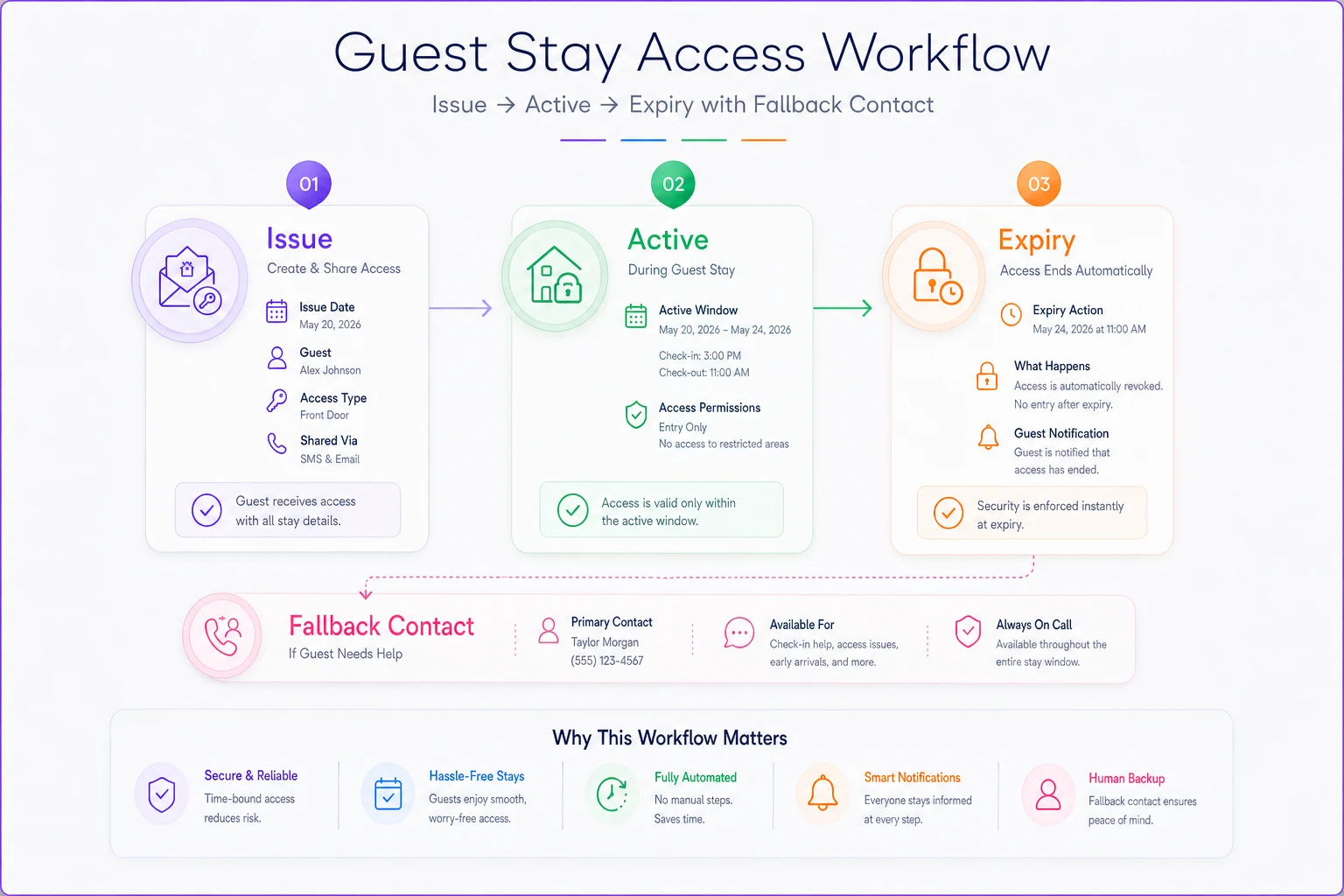
Place dates and an owner on each step so expiry doesn't get lost in someone's mental to‑do list.
The pre‑visit owner checklist
Before any guest arrives, run a short checklist with one person named as the owner of each line. "Named" matters — "someone should check the guest bathroom" is exactly how the guest bathroom doesn't get checked.
Pre‑visit checklist (run 24–48h ahead):
-
- [ ] Guest packet sent (digital) — owner
___
-
- [ ] Printed packet placed on counter — owner
___
-
- [ ] Code created and tested on the actual lock — owner
___
-
- [ ] Active window dates confirmed (on/off) — owner
___
-
- [ ] Backup contact told they're the fallback — owner
___
-
- [ ] Wi‑Fi password verified (not just assumed) — owner
___
-
- [ ] Pet handoff written + food stocked — owner
___
-
- [ ] Fragile/off‑limits areas noted or closed off — owner
___
-
- [ ] Trash/recycling day noted in packet — owner
___
The code‑tested line is the one people skip and regret. Creating a code and testing a code are different actions. Smart locks drop codes, keypads have dead batteries, and "I'm sure it works" is how a guest ends up locked out while you're on a plane.
Pet and pantry handoffs: the two that blow up quietly
Access failures are loud — the guest calls immediately. Pet and pantry handoffs fail quietly, which is worse, because you don't find out until the damage is done.
The pet handoff needs to be specific to the point of feeling excessive. Not "feed the cat" but "half a cup of the dry food in the blue bin, twice a day, morning and before bed — he'll act starving, he's not." Amounts, times, locations, and the one behavioral warning that prevents overfeeding or a missed med. Include the vet's number and your preferred emergency vet, because a sick pet during someone else's stay is the scenario where a missing phone number costs the most.
Pantry handoffs matter when a guest is staying long enough to cook. The failure here is invisible until you get home to a pantry that's either picked clean or weirdly duplicated — three new bottles of olive oil because nobody knew where things lived. If you already run a shared pantry inventory system, a guest stay is exactly when it earns its keep: the guest knows what's fair game, what's off‑limits, and where to put what they buy. Even a simple "help yourself to anything in these cabinets; please don't touch the shelf with labels" note prevents most of it.
The 30‑minute post‑visit recovery plan
This is the phase almost nobody builds, and it's the one that keeps the whole system honest. The moment a guest leaves, run a 30‑minute recovery pass. Not a deep clean — a reset that returns the house and your access list to a known state.
The 30‑minute recovery (do it the day they leave):
-
Minutes 0–5 — Kill access. Disable or rotate the guest code. Confirm it's actually off, not just scheduled to turn off "later." Account for any physical key.
-
Minutes 5–15 — Walk the house. Windows, doors, garage, thermostat back to your setting, appliances off. Note anything broken or low — supplies, pet food — so you're not surprised next time.
-
Minutes 15–25 — Reset the guest zones. Strip linens, wipe surfaces, restock the basics so the room is 80% ready for the next stay without a project.
-
Minutes 25–30 — Update the record. Note who stayed, when, what broke, what you'd change. Thirty seconds of notes now saves the next host the same surprise.
This is the same instinct behind prebuilt travel recovery flows — a short, repeatable reset beats a vague intention to "deal with it later." Later is when things slip.
Expiry scripts: the awkward "your access is ending" messages
The reason expiry gets skipped isn't laziness — it's that the messages feel awkward to send. So write them once and reuse them. Neutral, logistical, no guilt.
> "Hey! Checkout's at 11. No rush, but a few quick things: strip the bed and leave linens in the basket, leave the thermostat at 68, and the code stops working at noon. Thanks so much for staying — it was great having you!"
> "Just confirming you got off okay! Heads up, the door code's now disabled as planned. If you left anything behind, text me and we'll sort it out."
> "Looking forward to having you! Same as last time — I'll send a fresh code that's good for your dates. The old one won't work, so use the new one when you arrive."
A real scenario: the house with eleven codes
A two‑income household hosting family roughly once a month had quietly accumulated eleven active door codes over about two years. Guests, a dog sitter, a contractor who was supposed to be temporary, and a handful nobody could place. No stay had ever gone badly — but the owners admitted they genuinely didn't know who could walk in.
They rebuilt it as a lifecycle. Every stay now gets a dated code that auto‑expires, a packet they reuse and tweak, and a 30‑minute recovery pass the day guests leave. The first cleanup rotated or killed every code that didn't map to an active stay — down from eleven to zero standing codes.
The quieter win was the texting. The "how do I work the X" messages that used to interrupt their weekends dropped to almost nothing once the printed packet lived on the counter. A stay that used to cost them a scattered evening of prep and a handful of random interruptions turned into about 20 minutes of setup and a 30‑minute reset. Not dramatic — just no longer a thing they dreaded.
When this is worth it — and when it isn't
When it makes sense: You host more than a few times a year, you have a smart lock or the ability to rotate codes easily, or you've already had one "the code still works" or "nobody fed the fish right" moment. Pet and plant handoffs alone justify the packet.
When it's overkill: A single annual visit from someone who's been to your house a hundred times doesn't need a three‑phase lifecycle. Don't build process for a problem you don't have.
Who should skip it: If you only ever host one trusted person who stays in the same room with the same routine, a short standing note is plenty. The lifecycle pays off with variety — different guests, different durations, pets and plants in the mix. That's where ad‑hoc prep quietly breaks down.
The whole point is pretty simple: a stay has a beginning, a middle, and an end, and the end is a real step with a real owner. Build the packet once, put dates on your access, and run the 30‑minute reset when they leave. Do that, and hosting stops being a recurring scramble and becomes something that reliably turns on, works, and turns off — without you holding all of it in your head.
Ready to simplify your household management?
Join thousands of families using Famioly to save time, reduce home management stress, and keep the household running smoothly.