


Most households don't lose control of their digital life in one dramatic moment. It happens slowly. One person knows the Wi-Fi password and the streaming logins. Another has the banking app on their phone with Face ID. The kids' school portal lives in somebody's email inbox nobody checks. And then something interrupts the routine — a hospital stay, a lost phone, a divorce, a teenager who suddenly needs their own accounts — and you realize the entire system was held together by one person's memory.
That's the real problem with digital family governance. It isn't about having a password manager. Plenty of families have one and still can't function when the "main" person is unavailable. The issue is that access, devices, and digital clutter are all tangled together with no rules for who owns what, who can get in, and what happens when someone leaves or can't participate.
This is a systems article, not a tips list. The goal is to show how the pieces connect — vault rules, emergency delegation, device handoffs, and a recurring cleanup — so the whole thing keeps working as your family grows, shrinks, or changes shape.
Why digital access quietly becomes a single point of failure
In most homes, one person becomes the accidental administrator. They set up the router, they created the Amazon account back in 2016, they're the one who remembers the answer to "what was your first pet's name." Everyone else just asks them.
This works fine right up until it doesn't. A typical breakdown looks like this: the primary account holder travels for work, the home security camera subscription lapses because the payment card expired, and nobody else can log in to fix it because the account is tied to that person's phone number for two-factor verification. Now you've got a locked-out household and a camera system that's offline during the exact week nobody's home.
-
Knowledge concentration — critical logins live in one person's head or one person's phone.
-
No delegation path — even trusted family members can't get in during an emergency.
-
Orphaned accounts — subscriptions, portals, and shared services nobody actively manages.
-
Device entanglement — two-factor codes, authenticator apps, and recovery methods all routed through a single device.
What makes this worse than a typical office setup is that families rarely document anything. A business has offboarding checklists. A household just assumes everyone will always be around and cooperative. Reality disagrees.
The three layers of a working system
Think of digital family governance as three connected layers. Each one feeds the next, and a gap in any layer breaks the whole chain.
Stop losing track of household duties.
Famioly helps you organize, assign & complete family tasks efficiently.
- Centralized task management
- Shared family calendar
- Budget & expense tracking
No credit card required
| Layer | What it controls | What breaks without it |
|---|---|---|
| Shared vault | Where credentials live and who can see them | Access dies with one person; constant "what's the password" interruptions |
| Emergency delegation | Who steps in and how, during a crisis | Locked-out accounts during medical events, travel, or conflict |
| Device + declutter rhythm | How devices hand off access and how you prune the sprawl | 2FA chaos, orphaned subscriptions, unsafe old accounts piling up |
The mistake most families make is building only the first layer. They get a shared vault, feel organized, and stop. But a vault without delegation rules is just a nicer version of the same single-point-of-failure problem — because the vault itself is usually locked behind one master password and one person's biometrics.
Layer 1: Shared vault rules that survive real life
A shared vault is the foundation, but the rules around it matter more than the tool. Here's what actually keeps it usable long-term.
Separate "shared" from "personal" explicitly. The most common friction point is mixing a person's private logins with household ones. Nobody wants their therapy app login visible to their partner, and nobody should have to dig through personal clutter to find the gas bill account. Create clear zones: a household vault (utilities, shared streaming, home services, kids' school portals) and personal vaults that stay private.
Assign an owner to every shared entry. Every login in the household vault should have one named owner responsible for keeping it current. Not because that person is the only one who can use it — the whole point is shared access — but because when the payment card changes or the account needs updating, somebody has to actually do it. Ownerless entries rot.
Document the recovery method, not just the password. This is the part almost everyone skips. A password is useless if logging in triggers a text to a phone nobody else can access. For each critical account, record how recovery works: which phone number, which backup email, where the authenticator codes live. This single habit prevents the most painful lockouts.
Set a review owner and a cadence. Vaults drift. Passwords change, accounts get added in a hurry and never labeled properly. Assign one person to do a light monthly scan and a deeper quarterly review. If you've already built a broader household operating system with roles, triggers, and a cadence matrix, the vault review slots in as just another recurring role.
Attach the monthly light scan to whoever already handles household bills so it becomes part of an existing routine.
A quick note on scale: a two-adult household can run a vault fairly casually. Add teenagers who need their own logins, an aging parent whose accounts you're helping manage, or a caregiver who needs limited access, and casual stops working. That's when ownership and recovery documentation go from nice-to-have to essential.
Layer 2: Emergency delegate scripts
This is the layer that separates families who've actually thought about governance from those who haven't. The question is simple: if the main digital administrator is suddenly unavailable for a week — hospitalized, traveling somewhere with no signal, incapacitated — can someone else keep the household running?
Most families answer "probably?" and that "probably" is the whole problem.
An emergency delegate script is a short, specific document that tells a trusted person exactly what to do. Not vague reassurances — concrete steps. Here's the structure that works:
-
Who the delegate is. Name one primary and one backup. Make sure they know they've been named. A surprise delegate is useless.
-
How they get into the vault. The emergency access method — whether it's your password manager's emergency-access feature, a sealed written master password in a known location, or a legal arrangement. Write down where and how, not just "ask my sister."
-
The priority list. What actually needs attention in a crisis week? Usually it's a short list: mortgage or rent payment, utilities on autopay that might fail, the kids' school communication channel, any medical portals, pet or home services. Rank them.
-
The "do not touch" list. Equally important. Personal accounts, investment accounts, anything that shouldn't be altered without full context. Boundaries prevent well-meaning delegates from causing damage.
-
Who to notify. A small contact list — employer, school, key family members — with a one-line script for each.
The deeper point here is that delegation only works when decision rights are already clear. If your household constantly debates who gets to decide what, a crisis makes that ten times worse. Getting the groundwork right — the ideas in clear decision rights and channel rules — makes emergency delegation dramatically smoother, because the delegate already knows the boundaries of their authority.
When this actually makes sense: any household where one person handles the majority of digital administration, which is most of them. The more concentrated your setup, the more urgent the delegate script.
When it's overkill: if two adults already share everything equally, both have full vault access, and both know every recovery method, you still want a delegate for the "both unavailable" scenario — but you can keep it lighter.
Layer 3: Device handoff sequences
Devices are where governance gets physically messy. Two-factor authentication, authenticator apps, biometric logins, and recovery texts all live on specific pieces of hardware. When a device changes hands — a parent gets a new phone, a kid ages into their own device, someone leaves the household — the access tied to that device can silently break or stay dangerously open.
A device handoff sequence is a checklist you run every time a device enters or exits the household's access web.
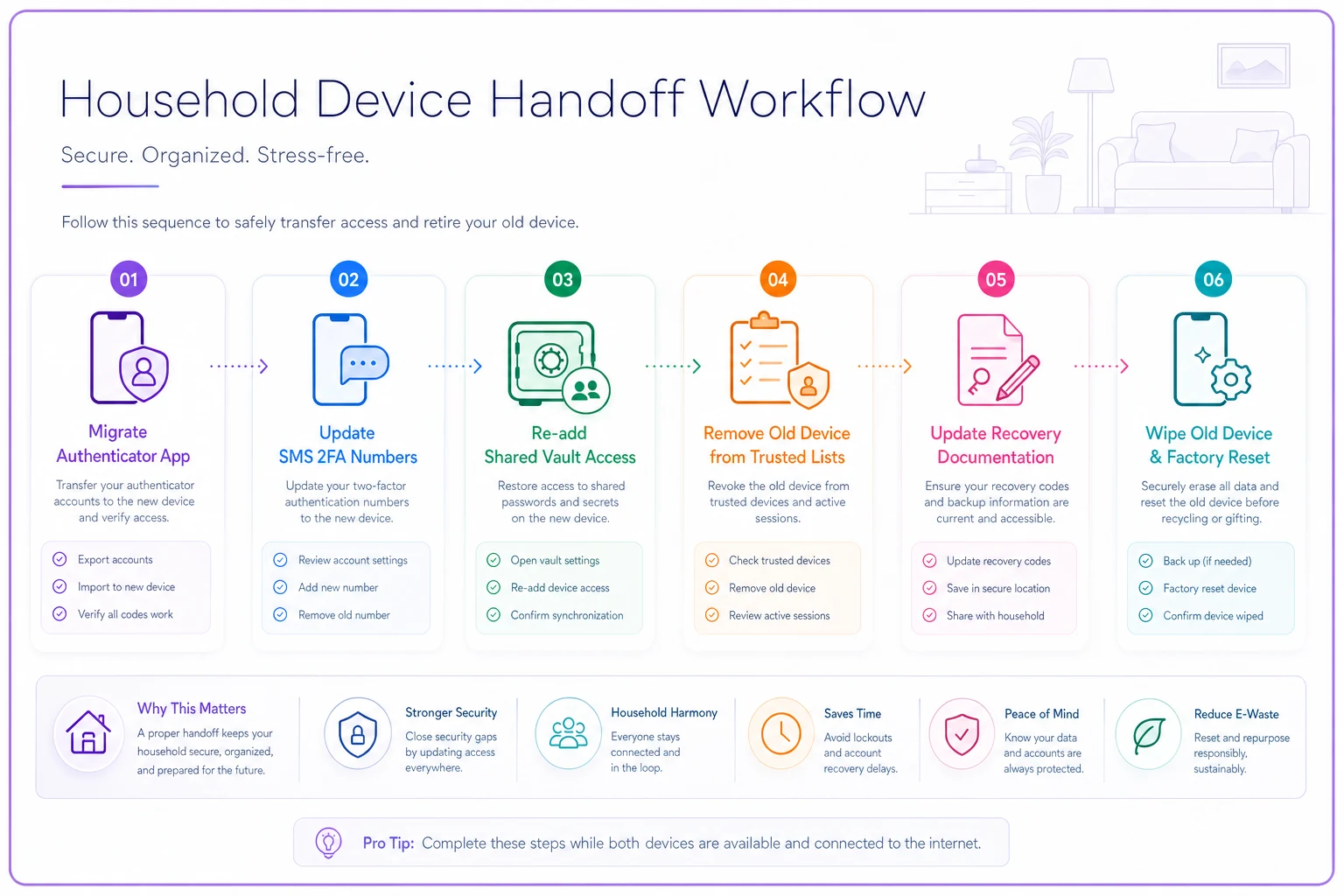
Here's a practical handoff checklist for when someone gets a new phone, which is the most common scenario and the one that breaks the most things:
-
[ ] Migrate the authenticator app and confirm codes work before wiping the old phone
-
[ ] Update the phone number on any account using SMS 2FA (banking, email, utilities)
-
[ ] Re-add shared vault access on the new device and confirm it unlocks
-
[ ] Remove the old device from trusted-device lists on key accounts
-
[ ] Update the recovery documentation in the vault if anything changed
-
[ ] Wipe the old phone only after everything above is confirmed
That last point gets skipped constantly. People trade in or hand down old phones, then discover a week later that their banking authenticator was only on the old device. The sequence exists to force the "confirm before wipe" order.
Here's a visual workflow to follow during a device handoff.
For kids aging into their own devices, the handoff is different — it's about creating independent access, not migrating it. A reasonable pattern: as a child moves toward their own accounts, you gradually separate their logins out of the household vault into their own managed space, keeping parental visibility where it's age-appropriate and stepping it down over time. This also keeps the household vault from getting cluttered with a teenager's dozens of app logins.
Every device change should trigger a vault update. If you treat these as separate chores, the vault's recovery documentation goes stale and you're back to square one during the next emergency.
The quarterly digital declutter ritual
Everything above is about structure. This last piece is about maintenance — and it's the part that prevents slow decay.
Digital clutter compounds. Subscriptions you forgot, accounts nobody uses, duplicate logins, outdated recovery info, photos buried in three different places. Left alone, it quietly undermines the whole system. A quarterly ritual — set it for the start of each season so it's easy to remember — keeps the sprawl in check. Here's a workable 90-minute version you can split across two people:
-
1. Subscription sweep (20 min). Pull up the last three months of statements and list every recurring charge. Cancel what nobody uses. Most households find two or three forgotten subscriptions per year — somewhere in the range of $15–$40 a month that was leaking quietly.
-
2. Vault audit (20 min). Remove dead accounts, fix any password marked weak or reused, and confirm each shared entry still has a correct owner.
-
3. Recovery check (15 min). Pick five critical accounts and verify the recovery method is still accurate — the phone number hasn't changed, the backup email still works. This is the single highest-value 15 minutes in the whole ritual.
-
4. Device trust cleanup (15 min). Review trusted-device and logged-in-session lists on email, banking, and your main accounts. Boot anything unfamiliar or outdated — old phones, borrowed laptops, that hotel smart TV you logged into once.
-
5. Digital asset tidy (20 min). Quick pass on shared photos and documents — naming, filing, deleting duplicates. Warranties and receipts belong in a real system too; if you don't have one, a minimal household tracking setup with tagging and reminder triggers keeps these from scattering across inboxes.
The ritual's real job isn't the cleanup itself — it's catching drift before it becomes a failure. Recovery methods going stale is what turns a minor crisis into a lockout. Running this check quarterly is cheap insurance against a genuinely bad week.
A real scenario
A blended family of five — two working parents, three kids across two prior households — ran everything through one parent's phone. School portals, a shared calendar, the mortgage autopay, a home security subscription, streaming, and the grocery delivery account were all tied to that phone's number and email.
When that parent had an unexpected surgery and a four-day hospital stay, the household stalled. The other parent couldn't approve a school field-trip form because the portal login was unknown. A utility autopay card had expired and the renewal notice went to an email nobody else monitored, nearly triggering a late fee. The security subscription lapse alert sat unread. Nothing catastrophic happened, but the week was far more stressful than the medical situation itself warranted.
Afterward they rebuilt it deliberately. They split the vault into household and personal, named the recovering parent and an adult sibling as emergency delegates with a written one-page script, moved 2FA onto an authenticator app that both adults could access, and set a quarterly declutter on the calendar. In the first cleanup they found about $30 a month in dead subscriptions and three accounts with recovery phone numbers that no longer existed.
The outcome wasn't dramatic in dollar terms — maybe a few hundred dollars saved over the year and a couple of near-miss late fees avoided. The real change was that the next time one parent traveled for a week, the other handled everything without a single "what's the password" text. The system worked whether or not the "main" person was reachable.
Where tools fit — and where they don't
A good password manager with emergency-access features, an authenticator app, and a shared family calendar cover most of the technical needs. If your household runs on broader coordination software, the vault review, device handoffs, and quarterly declutter all fit neatly as recurring tasks with assigned owners — the same way you'd track any other household responsibility. Reminders for the quarterly ritual, alerts when a subscription renews, nudges when a recovery method hasn't been verified in a while — those are all things automation handles well without much ongoing effort.
But the tool isn't the system. A family with a perfect password manager and no delegation rules is still one lost phone away from chaos. The governance — who owns what, who steps in, what happens when a device or a person changes — is the part that actually protects you. Software just makes it easier to maintain.
Pulling it together
Digital family governance works when the four pieces reinforce each other. The vault holds access cleanly separated by ownership. The delegate scripts make that access usable when the main person can't act. The device handoff sequences keep the technical plumbing from quietly breaking. And the quarterly ritual catches the drift before it becomes a 2 a.m. lockout during a genuine emergency.
Start with whichever layer is weakest. If one person holds all the keys, write the delegate script first. If your vault is a mess of personal and shared logins, sort that out before anything else. If you've never once checked whether your recovery methods still work, run that 15-minute check this week.
You don't need to build all of it at once — you just need to stop depending on one person's memory and one person's phone to keep your household running.
Ready to simplify your household management?
Join thousands of families using Famioly to save time, reduce home management stress, and keep the household running smoothly.