


Your household runs on invisible systems whether you realize it or not. The difference between families that feel constantly behind and those that seem to have everything handled? The second group documented their system.
Last month I helped a friend restructure their family operations after their third kid arrived. What struck me wasn't the chaos—every family with young kids deals with that. It was watching them recreate the exact same coordination failures I see in small businesses that grow from 3 to 8 employees without updating their operational structure.
Households handle budgets, schedules, inventory, maintenance, emergencies, and long-term planning. You're essentially running a small operation with multiple stakeholders, competing priorities, and limited resources. Yet most families try to manage all this through group texts and mental notes.
The solution isn't working harder or downloading another app. It's building what I call a household operating system—a clear framework that defines who does what, when things happen, and how decisions get made.
The missing piece: why most household systems fail before they start
Every January, families try to get organized. They buy planners, download apps, create chore charts. By March, those systems are abandoned. The pattern repeats because these aren't really systems—they're just tools without an underlying operational structure.
Real operational systems have three core components that most household planning misses:
First, role clarity. Not just "who does dishes" but actual ownership areas with decision-making authority. When the dishwasher breaks, who decides whether to repair or replace? Who has the authority to spend $200 on an emergency plumber without checking with anyone else?
Second, trigger-based actions instead of time-based reminders. Your car doesn't need an oil change every Sunday at 2pm—it needs one when the odometer hits certain numbers or the sticker date arrives. Most household tasks work the same way. The furnace filter changes when it's dirty, not because the calendar says so.
Third, escalation paths for when things go wrong. What happens when the person responsible for school pickups gets stuck at work? Who's the backup? Who's the backup's backup? Without this, every minor disruption becomes a crisis.
These concepts work in every successful business operation. But households rarely formalize these structures, which creates unnecessary friction and dropped balls.
Building your household org chart (yes, really)
An org chart for a family sounds ridiculous until you realize you already have one—it's just undocumented and full of gaps.
Stop losing track of household duties.
Famioly helps you organize, assign & complete family tasks efficiently.
- Centralized task management
- Shared family calendar
- Budget & expense tracking
No credit card required
Start by mapping operational domains, not chores. Instead of "takes out trash," think "waste management owner." This person doesn't just haul bags to the curb. They track when bulk pickup happens, know the recycling rules, manage the compost system if you have one, and decide when to deep-clean the bins.
Here's a realistic domain breakdown for a two-parent household:
Financial Operations Lead: Manages accounts, pays bills, tracks spending, handles taxes, coordinates with financial advisors. Makes autonomous decisions up to agreed spending limits.
Logistics Coordinator: Owns calendars, appointments, school communications, activity signups, transportation planning. Has authority to commit family time and resources within set parameters.
Facilities Manager: Maintains home systems, coordinates repairs, manages service providers, tracks warranties. Can approve maintenance expenses up to a specific threshold without consultation.
Inventory & Supplies Chief: Manages groceries, household supplies, clothing needs, gift purchasing. Owns all subscription services and regular ordering cycles.
Health & Medical Director: Tracks appointments, medications, insurance, medical records. Makes healthcare decisions within agreed frameworks.
Notice what's missing? "Cooking" and "cleaning" aren't domains—they're tasks that might fall under multiple owners or rotate based on availability. The Inventory Chief might plan meals while the Logistics Coordinator handles dinner prep based on who's home when.
Give each domain owner real authority. If you're the Financial Operations Lead, you don't ask permission to pay the electric bill or switch to a better credit card. You own those decisions within agreed boundaries.
Event triggers that actually work in family life
Time-based schedules create unnecessary rigidity. "Clean the bathroom every Saturday" falls apart when Saturday becomes soccer tournament day. Event-based triggers adapt to real life.
Map your household triggers to actual events:
Threshold triggers:
-
When laundry basket reaches 80% full → start a load
-
When pantry staples drop below minimum → add to shopping list
-
When car mileage hits marker → schedule maintenance
-
When printer paper stack drops below 20 sheets → reorder
Cascade triggers:
-
Kid signs up for activity → add to calendar → arrange transportation → update budget → order required gear
-
Guest confirms visit → prep guest room → plan meals → adjust grocery list → coordinate schedules
-
Major appliance fails → assess repair vs replace → get quotes if needed → make decision → schedule service
Seasonal triggers:
-
First frost warning → winterize outdoor faucets, bring in plants, service heating system
-
Tax document arrives → add to tax folder → when all documents collected → schedule tax appointment
-
School supply list published → inventory existing supplies → purchase gaps → organize materials
The power here is removing decision fatigue. When the trigger hits, the action is automatic. No negotiation, no wondering if it's time, no checking with anyone else unless the action requires escalation.
The household cadence matrix that keeps everything visible
Different operational tasks need different rhythms. Daily tasks shouldn't mix with annual planning.
| Cadence | Operations | Owner | Triggers |
|---|---|---|---|
| Daily | Kitchen reset, tomorrow's logistics check, kid bedtime routine | Rotating based on schedule | End of dinner, 8pm checkpoint, bedtime |
| Weekly | Grocery planning, calendar sync, quick finance check, meal prep | Domain owners | Sunday morning, Friday evening |
| Monthly | Bill review, deep clean rotation, inventory check, maintenance scan | Domain owners | First weekend, statement arrivals |
| Quarterly | Budget review, seasonal swaps, goal check-in, system updates | All stakeholders | Season change, school breaks |
| Annual | Tax prep, insurance review, major purchase planning, system overhaul | Domain leads with full team | January, policy renewals |
Within each cadence, specify what "done" looks like. Weekly grocery planning means list made, budget checked, and pickup/delivery scheduled—not just "thought about food."
Here's a visual to help map cadences to owners and triggers.
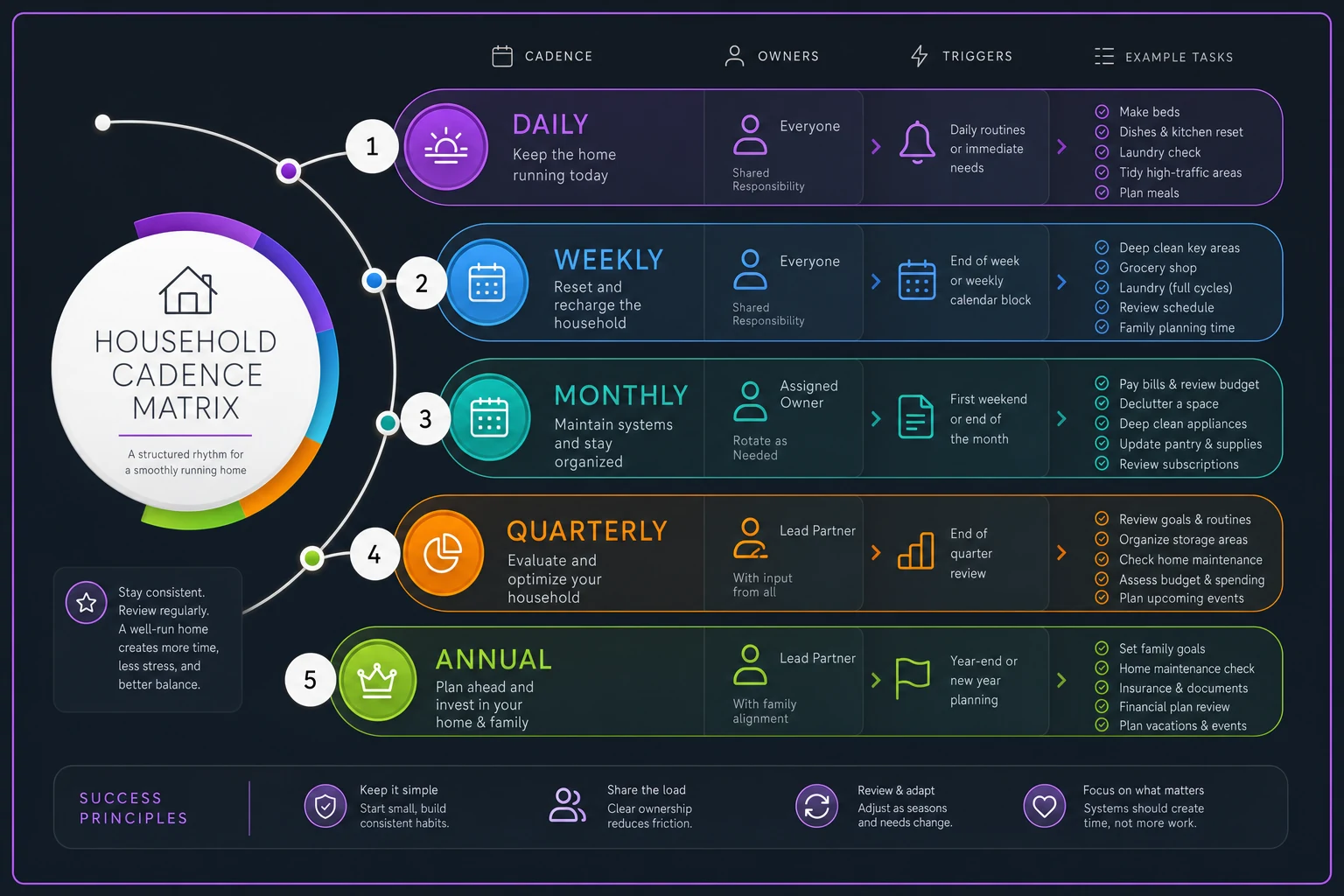
The matrix prevents important-but-not-urgent tasks from disappearing. That annual insurance review happens because it has a clear owner, trigger, and defined outcome.
Escalation rules that prevent 10pm panic texts
Every operational failure in households comes down to unclear escalation. The dishwasher floods while one parent is traveling. The kid's sick at school but the primary parent is in a meeting. The car breaks down on the way to an important appointment.
Build escalation rules before you need them:
Level 1 - Domain owner handles independently
-
Decisions under $100
-
Schedule changes affecting only them
-
Routine maintenance and supplies
-
Standard vendor communications
Level 2 - Quick consultation required
-
Expenses $100-$500
-
Schedule changes affecting others
-
New recurring commitments
-
Switching service providers
Level 3 - Full discussion needed
-
Expenses over $500
-
Major schedule commitments
-
Health decisions beyond routine
-
Anything affecting home equity
Emergency override - Act first, discuss later
-
Health emergencies
-
Home safety issues (flooding, electrical, gas)
-
Security concerns
-
Stranded family members
For each domain, document the backup person. When the Logistics Coordinator can't do school pickup, the Facilities Manager might be backup. When they're also unavailable, you have predetermined options: call grandparent, activate carpool backup, or use approved rideshare with specific protocols.
The template you can copy and modify today
Here's a working household operating system template:
Step 1: Domain Assignment
-
Financial Operations
[Primary] / [Backup]
-
Logistics & Calendar
[Primary] / [Backup]
-
Facilities & Maintenance
[Primary] / [Backup]
-
Inventory & Supplies
[Primary] / [Backup]
-
Health & Medical
[Primary] / [Backup]
Step 2: Authority Limits
-
Autonomous spending limit
$[amount]
-
Time commitment authority
[hours/week]
-
Vendor selection power
[yes/no]
-
Emergency override authority
[specific situations]
Step 3: Trigger Documentation
-
Daily
[List 3-5 essential daily triggers]
-
Weekly
[List 5-7 weekly operational triggers]
-
Monthly
[List 4-6 monthly review triggers]
-
Quarterly
[List 3-4 planning triggers]
-
Annual
[List major annual requirements]
Step 4: Escalation Framework
-
Independent action threshold
$[amount] and [types of decisions]
-
Consultation required
$[amount] and [types of decisions]
-
Full discussion
$[amount] and [types of decisions]
-
Emergency authority
[specific scenarios]
Step 5: Communication Protocol
-
Daily sync
[time and format]
-
Weekly planning
[day and duration]
-
Monthly review
[date and agenda]
-
Emergency notification
[method and backup method]
Start with just one domain—get Financial Operations running before adding Logistics.
Start with just one domain. Get Financial Operations running smoothly before adding Logistics. Build the system incrementally rather than trying to transform everything at once.
When your household OS needs operational software support
As households get more complex—multiple kids in activities, aging parents needing support, side businesses, investment properties—the manual household operating system hits its limits. AI-powered operational software becomes genuinely useful here, not as a replacement for your system but as infrastructure that makes it run smoother.
Small businesses use operational platforms to coordinate between team members. Modern households benefit from software that can track triggers, automate routine communications, and maintain the institutional knowledge of how things work. The dishwasher repair history, the specific brand of furnace filter that actually fits, the pediatrician's after-hours protocol—these details need a permanent home that any family member can access.
AI automation particularly helps with the mundane coordination tasks that eat up mental bandwidth. Automatically moving bills to the right category, flagging when insurance needs renewal, or notifying the backup person when the primary can't handle school pickup—these are perfect use cases for AI agents that understand your household's specific operational patterns.
The goal isn't to over-engineer family life. It's to reduce the cognitive overhead of running a household so you can focus on what matters—actually enjoying time with your family instead of constantly coordinating logistics.
Making it stick: implementation without overwhelm
Most families abandon organizational systems because they try to implement everything at once. Build incrementally instead.
Week 1: Assign just two domains. Pick the ones causing the most friction. Usually Financial Operations and Logistics create the most daily stress. One person takes each, with clear authority limits.
Week 2: Document your first triggers. Start with daily ones—what absolutely must happen each day and what triggers each action. End of dinner triggers kitchen reset. Kids in bed triggers tomorrow's logistics review.
Week 3: Add your escalation rules. Define spending limits and emergency protocols. When someone has authority to act independently versus when they need to check in.
Week 4: Run your first monthly review. Look at what's working, what's breaking down, and what needs adjustment. The system should evolve with your family's needs.
The families that successfully implement this don't aim for perfection. They aim for clarity. Everyone knows who owns what, when things happen, and what to do when plans fall apart.
Your household is already an operation. The question is whether you're running it intentionally or just reacting to whatever breaks next. A documented household operating system isn't about rigidity or removing spontaneity. It's about handling the predictable stuff efficiently so you have energy left for what's actually important.
Build the system that fits your family. Start small. Adjust often. And watch how much mental space opens up when everyone knows their role, triggers are clear, and the escalation path is defined before you need it.
Ready to simplify your household management?
Join thousands of families using Famioly to save time, reduce home management stress, and keep the household running smoothly.