



Most families don't overspend on subscriptions because they're careless. They overspend because subscriptions are designed to be invisible. The charge is small, it's spread across three or four cards and two app stores, and nobody actually decided to keep paying for it. It just... kept going.
The fix isn't willpower or a spreadsheet you'll abandon by February. It's a repeatable, time‑boxed sweep you run four times a year. Twenty minutes, same cadence, same decision rules every time. This post walks through exactly how to run that sweep — the CSV intake, the keep/split/cancel rules, the cost‑split math for shared plans, the scripts to negotiate a rate down, and how to log reimbursements so the person who paid actually gets paid back.
The goal here is boring on purpose: subscription reconciliation family means treating your household subscriptions the way a small business treats recurring vendor charges. Not emotionally. Procedurally.
Why subscriptions quietly become the messiest line in the household budget
Three things make subscriptions uniquely hard to control compared to other spending.
First, the money comes out of multiple places. Netflix is on the joint card. The kid's game pass is on a parent's Apple ID. A fitness app renewed on a debit card nobody checks. One grocery delivery membership is tied to an email address the other partner doesn't have access to. There's no single screen that shows the full picture, which means no single person ever sees the full number.
Second, price creep is silent. The streaming service you added at $9.99 is now $15.49. The cloud storage went from $2.99 to $9.99 when you crossed a tier. None of these triggered a decision. They triggered an email you didn't open.
Third, nobody owns the cancel. Everyone assumes someone else is using it. "We still watch that, right?" is not a budget policy. In practice, the thing that stops a wasted subscription is a named person looking at a named charge on a scheduled day — and nothing else.
A typical example looks like this: a family of four, two adults, two kids. When they finally listed everything out, they found 23 active subscriptions totaling around $310/month. Four were straight duplicates — two music services, two overlapping streaming bundles. Three were free trials that had quietly converted. Two were for a kid's app nobody had opened in half a year. After one sweep they were down to roughly $220/month — close to $1,000 saved annually — without losing anything they actually used.
The whole ritual, start to finish
Here's the 20‑minute flow. The point of time‑boxing it is that you make decisions fast and skip the agonizing.
Stop losing track of household duties.
Famioly helps you organize, assign & complete family tasks efficiently.
- Centralized task management
- Shared family calendar
- Budget & expense tracking
No credit card required
-
Pull the data (5 min). Export recent statements and app‑store receipts as CSV, or screenshot the recurring charges.
-
Dump it into one intake sheet (3 min). One row per subscription. Doesn't need to be pretty.
-
Run keep/split/cancel on each row (6 min). Use the rules below. One pass, no revisiting.
-
Handle the cancels and negotiations — obvious ones now, the rest assigned out.
-
Update the cost‑split and settle reimbursements (6 min).
That's it. Quarterly. Put it on the calendar as a recurring 20‑minute block, ideally attached to something you already do — same weekend you run bills, or right after a family meeting that closes action items.
A quick visual of the flow can help the family know what to expect each quarter.
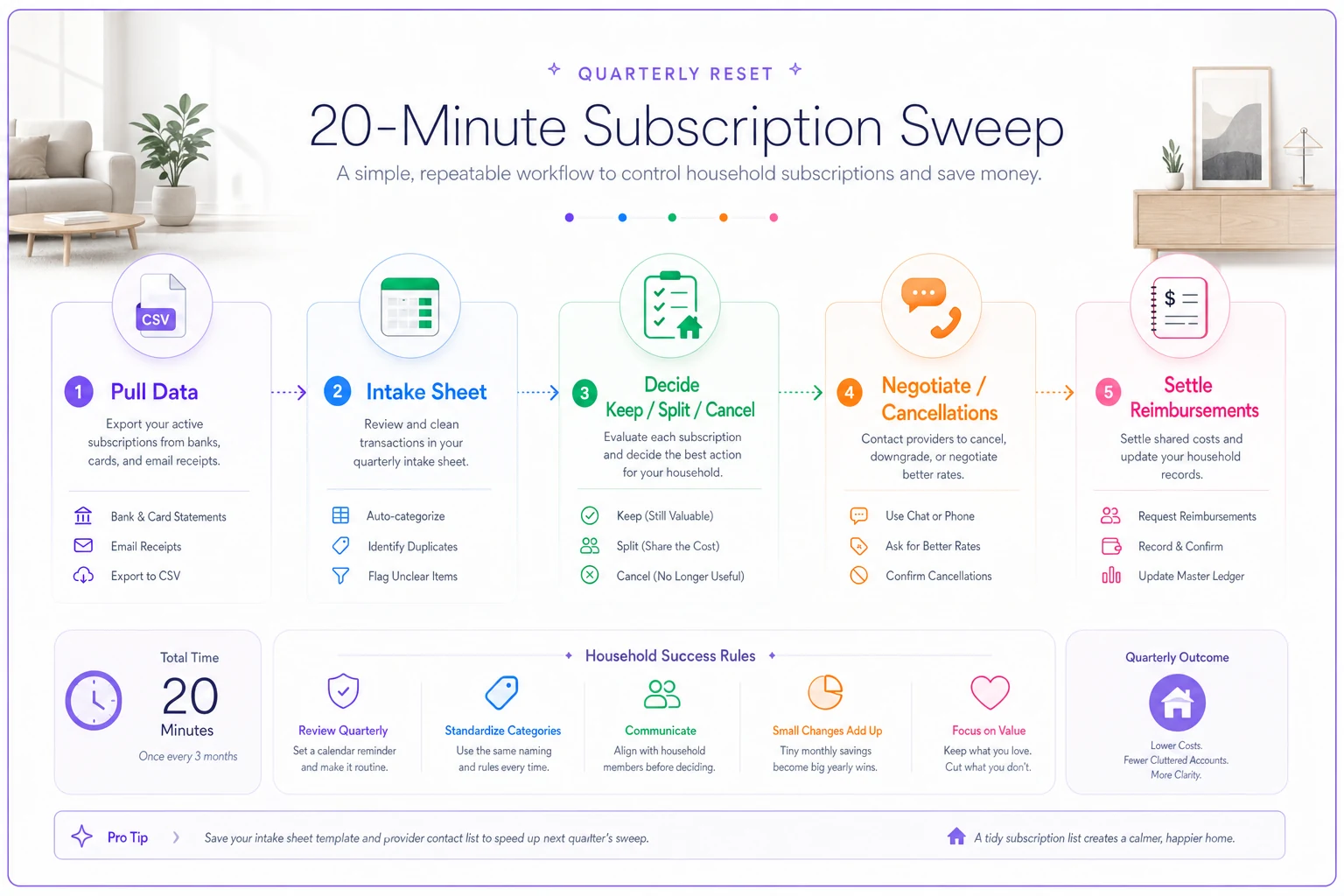
Keep the cadence the same every quarter so it becomes a habit rather than an ad hoc argument.
Step 1: CSV intake — getting every charge into one place
The hardest part of subscription reconciliation family work is simply seeing everything. Your statement won't label things clearly — a charge might read "DNH*HULU" or "APPLE.COM/BILL." So the intake has two sources:
-
Bank/credit card CSV exports — most banks let you download the last 30–90 days as CSV. Filter for recurring merchants.
-
App store receipts — Apple and Google both email itemized receipts and have a "subscriptions" screen. These catch the charges your bank statement blurs into one "Apple" line.
Build a single intake sheet with these columns:
| Column | What goes in it |
|---|---|
| Service | Netflix, iCloud, Spotify, etc. |
| Charged to | Which card / account / app store |
| Owner | Who manages it |
| Amount | Current charge |
| Cycle | Monthly / annual |
| Who uses it | Dad, both kids, whole house |
| Last used | Rough guess is fine |
| Decision | Keep / Split / Cancel / Negotiate |
The export/import step matters more than it sounds. When you pull a raw CSV instead of eyeballing an app, you catch the charges that live on cards you forgot about. In real households, the forgotten card is where the waste hides — the old debit card still tied to a trial from two Christmases ago.
If you already keep a central money sheet, this intake plugs right into it. The Household Finance Operational Toolkit covers the reconciliation sheet structure if you want the subscription intake to live alongside the rest of your recurring costs rather than in a separate file.
Step 2: The keep / split / cancel decision rules
This is where most people stall, because every subscription triggers a tiny debate. Kill the debate with rules you apply the same way every quarter. Don't rely on memory or mood.
Cancel if any of these are true:
-
Nobody's opened it in ~60 days and it's not seasonal (e.g., not a tax app in April).
-
It duplicates something else you're keeping — two music apps, two overlapping streamers.
-
It converted from a free trial you never actively chose to continue.
-
The renewal price jumped and the new price fails the "would I sign up fresh at this rate?" test.
Negotiate (before you cancel) if:
-
The price crept up but you'd keep it at the old rate.
-
There's a cheaper tier that covers your actual use — you're on 4K but watch on a phone.
-
A competitor is running a promo worth using as leverage.
Split if:
-
More than one adult or household unit benefits and it's not already shared fairly.
-
It's a family plan where one person is quietly covering everyone.
Keep (no action) if:
-
Used regularly, priced fairly, already split correctly.
One thing worth internalizing: the "keep" decision should be the loudest one, not the default. A subscription survives because someone actively confirmed it's used and fairly priced — not because nobody got around to canceling it. Flip the burden of proof and your sweep gets dramatically cheaper.
The "would I sign up fresh today?" question is the single most useful filter here. If you wouldn't pay the current price to start, you shouldn't pay it to continue. Sunk cost doesn't apply to monthly charges — there's no sunk cost on a payment that hasn't happened yet.
Step 3: Family cost‑split formulas that don't start arguments
Shared plans are where resentment builds, because one person's card eats the whole charge and "I'll get you back" never quite happens. You need a formula, applied consistently, so nobody's doing mental math or quietly feeling shorted.
Even split. Total ÷ number of adult users. Use for things everyone uses roughly equally. > Family streaming at $15.49, two adults sharing → $7.75 each.
Weighted by use. Assign rough shares based on who actually uses it. Use when consumption is lopsided. > A $17.99 music family plan with 6 profiles but really used by 3 people — two adults and one teen. Split 3 ways → ~$6.00 each, teen's share folded into allowance or just absorbed.
Owner‑keeps‑it. One person uses it, one person pays, no split. Keep this explicit so it doesn't get counted twice later.
For mixed plans — a family bundle covering streaming + storage + a game pass — split per included service, not the lump sum, because the people benefiting differ. Dad uses the storage, the kids use the game pass, everyone watches the shows. Allocate each slice, then total per person.
| Service | Amount | Split method | Person A | Person B |
|---|---|---|---|---|
| Streaming | $15.49 | Even | $7.75 | $7.75 |
| Cloud storage | $9.99 | Owner (A) | $9.99 | $0 |
| Kids' game pass | $9.99 | Even | $5.00 | $5.00 |
| Music family | $16.99 | Weighted | $11.33 | $5.66 |
| Totals | $52.46 | $34.07 | $18.41 |
Person A is carrying nearly twice Person B — which is fine if it's visible and agreed on. The problem is never the imbalance. It's the imbalance nobody discussed. If your household needs a clearer framework for which costs are shared versus personal in the first place, the groundwork in setting cadence and decision rules for shared vs. personal accounts will save you from re‑litigating this every quarter.
Step 4: Scripts to negotiate the price down before you cancel
Cancelling is final. Negotiating is often free money, because retention teams have real discretion — especially right as you hit a renewal or signal you're about to leave. These work. Keep them short.
Email / chat script (price creep):
> "Hi — my renewal just went up to [new price]. I've been a subscriber for [X months/years] and I'm deciding whether to keep the plan at this rate. Is there a loyalty discount, a cheaper tier, or a current promo you can apply to my account? If not, I'll need to cancel before the next charge."
Phone script (retention line):
> "I'm calling to cancel [service]. Before I do — is there anything you can offer to keep me? I'm paying [current price] and I've found [competitor/promo] at [lower price]." > > Then stop talking. Let them make the offer. The silence does the work.
Downgrade script (you're over‑tiered):
> "I'm on the [premium] plan but I really only use [basic feature]. Can you move me to the lowest tier that still covers that, and confirm the new monthly price?"
The pattern that works across almost every one of these: name a specific lower number — a competitor's price or your old rate — state a real deadline like the renewal date, and be willing to actually walk. Retention offers are often 20–40% off for 6–12 months, which alone can justify the whole sweep.
One caution: write the offer's expiry into your intake sheet. A 6‑month discount that reverts to full price is just a future problem you scheduled for yourself. Note the revert date so next quarter's sweep catches it.
Step 5: The settlement ledger — so reimbursements actually happen
This is the step almost everyone skips, and it's why cost‑splitting fails in practice. You can agree on a perfect split and still never move the money. A settlement ledger fixes that by turning "you owe me" into a dated, recorded row that gets cleared.
| Date | Who paid | Who owes | Service(s) | Amount owed | Settled? | Settled date |
|---|---|---|---|---|---|---|
| Q1 sweep | Person A | Person B | Shared bundle (Q1) | $55.23 | ✅ | Jan 14 |
| Q2 sweep | Person A | Person B | Shared bundle (Q2) | $55.23 | ⬜ | — |
Rules that keep it honest:
-
Settle at the sweep, not "sometime." One transfer, quarterly, clears the balance.
-
Net it out. If both people paid for different shared things, calculate the single net transfer rather than two payments crossing each other.
-
Mark it settled with a date. An unsettled row that lingers two quarters means the whole system quietly died.
Net transfers instead of two payments crossing each other keeps settlement tracking simple.
For households that already run reimbursement workflows for groceries, caregivers, or other shared expenses, fold subscription settlements into that same cadence instead of running a separate one. The fewer separate money rituals you maintain, the more likely any of them survive.
A quick, copyable checklist for the sweep day
The point of time‑boxing it is that you make decisions fast and skip the agonizing.
-
Export last 90 days of charges as CSV from each card
-
Pull app‑store subscription screens (Apple + Google)
-
One row per subscription in the intake sheet
-
Mark last‑used (rough is fine) and current price
-
Apply keep / split / cancel / negotiate to every row
-
Cancel the obvious waste immediately
-
Send negotiation emails for price‑creep items
-
Recalculate per‑person split for shared plans
-
Add settlement rows and make the net transfer
-
Note any discount expiry dates for next quarter
Put it on the calendar as a recurring 20‑minute block, ideally attached to something you already do — same weekend you run bills, or right after a family meeting that closes action items.
Templates for common family‑plan cases
Case: Two overlapping streaming services. Keep the one with the shows you watched in the last month; cancel the other. If you genuinely use both, drop each to its cheapest ad‑supported tier and reassess next quarter. Don't keep two premium tiers "just in case."
Case: One adult pays for everyone's music/streaming. Switch to an even or weighted split, log it in the ledger, and settle quarterly. The payer shouldn't be silently subsidizing the household.
Case: A kid's app or game pass. Decide if it's a shared household cost or part of the kid's allowance. Either is fine — just make it explicit so it's not double‑counted or quietly forgotten.
Case: Free trial that converted. Default to cancel. If it's genuinely useful, re‑subscribe deliberately. "It already charged me" is not a reason to keep paying.
Case: Annual plan mid‑cycle. Don't cancel immediately — note the renewal date in the sheet and decide before it auto‑renews. Set the decision for the sweep closest to that date.
When this ritual is worth it — and when it isn't
Worth it if you've got more than 8–10 active subscriptions, charges spread across multiple cards or app stores, and shared plans where one person foots the bill. That's the setup where waste compounds and reimbursements get forgotten.
Overkill if you've got four subscriptions, one card, and one person managing money. Just check the renewals once a year and move on. Don't build process for a problem you don't have.
Skip the formal split entirely if your household runs fully joint finances and nobody's tracking who paid for what. In that case, keep only the keep/cancel/negotiate steps — the settlement ledger is pointless when it's all one pot.
The real point
Subscription waste isn't a discipline failure. It's a visibility failure plus a decision failure plus a settlement failure, stacked on top of each other. The sweep works because it attacks all three in one short, scheduled pass: it makes everything visible through the CSV intake, forces a decision with fixed rules via keep/split/cancel, and closes the loop on money owed through the settlement ledger.
Run it four times a year. Keep it to twenty minutes. The first sweep usually pays for a year of better dinners out — and after that, it's just maintenance on a problem that quietly tries to grow back every single quarter.
Ready to simplify your household management?
Join thousands of families using Famioly to save time, reduce home management stress, and keep the household running smoothly.