


The dishwasher starts leaking again. The HVAC blower sounds like a jet engine. The 9-year-old fridge is warm on the left side. And every single time, the same argument happens: is it worth fixing, or do we just replace it?
Most households answer this with vibes. One person remembers the last repair bill and wants to replace. The other hates the idea of spending four figures and wants to limp it along. Nobody actually runs the numbers, so the decision swings on whoever argues harder or whoever's more tired that night.
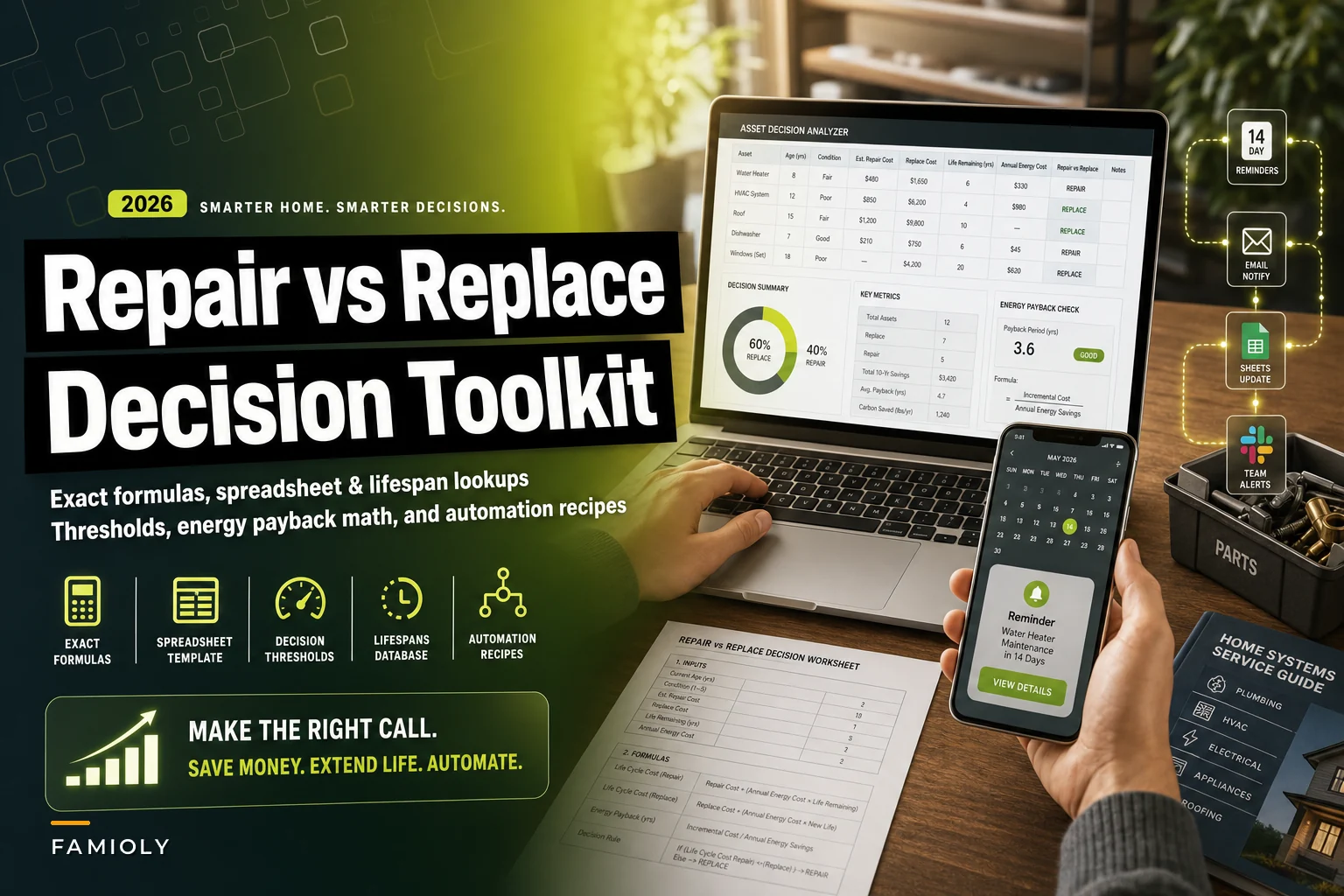
That's a bad way to spend money. The whole thing collapses into a handful of variables you can put in a spreadsheet once and reuse for the next 20 years of appliances, electronics, and equipment. This is the build-it-yourself version of the simple repair‑vs‑replace decision method — same logic, but with the exact formulas, column templates, lifespan tables, and reminder automations so you never have to re-derive it.
The core math: four numbers that settle most arguments
Every repair-vs-replace call comes down to comparing the cost of keeping the old thing against the cost of the new thing, spread over how long each will last. The trap people fall into is comparing a $280 repair against a $900 replacement and stopping there. That's not the real comparison. The real comparison is cost per remaining year of service.
Here are the variables you need:
-
R = repair cost (the quote in front of you)
-
P = replacement price (new unit, installed, delivered — all-in)
-
A = current age of the item (years)
-
L = expected total lifespan of that item type (years)
-
Lₙ = expected lifespan of the new unit (usually the same as L unless you're upgrading quality)
From those, two formulas do almost all the work.
Repair-cost ratio:
``
repair_ratio = R / P
``
Cost per remaining year (repair path):
``
remaininglife = max(L - A, 0.5)     // never divide by zero
costperyearrepair = R / remaining_life
``
Cost per year (replace path):
``
costperyear_replace = P / Ln
``
If costperyearrepair is clearly higher than costperyearreplace, replacing is the rational move even if the sticker price scares you. If it's clearly lower, repair wins. The messy middle is where thresholds and a couple of tiebreakers come in — more on that below.
One pattern worth calling out: people massively overweight the repair they just paid and underweight the slow bleed of repeated small fixes. A $190 fix on a 12-year-old washer feels cheap in isolation. Three of those in 18 months on a machine that should last 11 years total is not cheap — that's a replacement paid in installments, with the inconvenience of breakdowns thrown in for free.
The 50% rule, and why the age modifier matters more
The classic heuristic is the "50% rule": if the repair costs more than half the replacement price, replace it. Fine starting line, but applied flat it gets you in trouble because it ignores age entirely.
Stop losing track of household duties.
Famioly helps you organize, assign & complete family tasks efficiently.
- Centralized task management
- Shared family calendar
- Budget & expense tracking
No credit card required
A repair ratio of 0.45 on a 2-year-old dishwasher? Fix it — the machine has a decade left. The same 0.45 ratio on an 11-year-old dishwasher? That's throwing good money after bad, because you're spending 45% of a new unit's cost to buy maybe two or three more years.
The better rule combines ratio and a "percent of life used."
``
life_used = A / L
``
| Condition | Decision |
|---|---|
| repairratio ≤ 0.30 and lifeused < 0.70 | Repair — clear win |
| repairratio ≤ 0.50 and lifeused < 0.50 | Repair — still worth it |
| repair_ratio > 0.50 | Replace — regardless of age |
| life_used ≥ 0.80 | Replace — unless repair is trivial (< 0.15 ratio) |
| everything else | Tiebreaker zone (see below) |
What this table captures that the plain 50% rule misses: an old item with a cheap repair can still be worth fixing, and a youngish item with an expensive repair can still be worth replacing. Age and cost interact. Treating them separately is where households make the wrong call.
Lifespan lookups you can drop into a sheet
The math only works if your L values are realistic. People guess high because they remember the one fridge that lasted 22 years and forget the three that died at 10. Here are working planning numbers for common household items:
| Item | Expected lifespan (years) |
|---|---|
| Refrigerator | 12–14 |
| Dishwasher | 9–11 |
| Clothes washer | 10–12 |
| Clothes dryer | 11–13 |
| Gas range / oven | 13–15 |
| Microwave | 8–9 |
| HVAC – furnace | 15–18 |
| HVAC – AC condenser | 12–15 |
| Water heater (tank) | 8–12 |
| Water heater (tankless) | 18–20 |
| Garbage disposal | 8–12 |
| Laptop | 4–6 |
| Smartphone | 3–5 |
| Lawn mower (gas) | 8–10 |
| Vacuum cleaner | 6–8 |
When you build your sheet, use the low end of the range if the item has been heavily used or poorly maintained, and the midpoint for normal use. Pessimism here is protective — it's cheaper to replace slightly early than to keep pouring money into something on its last legs.
The spreadsheet template (columns + formulas)
Here's the exact column layout. Build this once in Google Sheets or Excel and it handles every future decision.
-
A — Item name
-
B — Purchase date
-
C — Current age (years)
-
D — Expected lifespan (L)
-
E — Replacement price, all-in (P)
-
F — Repair quote (R)
-
G — Under warranty? (Yes/No)
-
H — Repair ratio
-
I — Life used %
-
J — Cost/year if repaired
-
K — Cost/year if replaced
-
L — Recommendation
Formulas (assuming row 2, with dates and numbers already filled in):
Current age from purchase date:
``
C2 =ROUND((TODAY()-B2)/365.25, 1)
``
Repair ratio:
``
H2 =IF(E2=0,"",F2/E2)
``
Life used:
``
I2 =IF(D2=0,"",C2/D2)
``
Cost per year repaired:
``
J2 =IF((D2-C2)<=0, F2/0.5, F2/(D2-C2))
``
Cost per year replaced:
``
K2 =IF(D2=0,"",E2/D2)
``
Recommendation (the logic engine):
``
L2 =IF(G2="Yes","REPAIR (under warranty)",
   IF(H2>0.5,"REPLACE",
   IF(AND(I2>=0.8,H2>0.15),"REPLACE",
   IF(AND(H2<=0.3,I2<0.7),"REPAIR",
   IF(AND(H2<=0.5,I2<0.5),"REPAIR",
   IF(J2>K2,"REPLACE","REPAIR — review"))))))
``
That last REPAIR — review is the tiebreaker flag. It means the math is close enough that non-dollar factors should decide — reliability history, noise, energy use, how much the breakdown disrupts daily life.
One small but important thing: keep E (replacement price) as the installed, delivered, hauled-away number, not the shelf price. People compare a $650 repair against a $900 sticker and forget the $140 install and $60 old-unit removal. Once you add those in, the repair often looks better than it did — or the replacement reveals its true cost.
Energy savings: the variable that flips close calls
For anything that runs constantly — fridges, HVAC, water heaters — an old unit's energy waste can quietly justify replacement even when the repair math says "keep it." Most households never calculate this, and it's often the deciding factor.
To work out whether energy savings change your decision, follow these steps in order:
-
Find the old unit's annual energy cost (check the old EnergyGuide label, or estimate from wattage × hours × your electricity rate).
-
Find the new unit's estimated annual energy cost (on its EnergyGuide label).
-
Annual savings = old cost − new cost.
-
Net replacement cost = replacement price − what you'd have spent on the repair anyway.
-
Payback years = net replacement cost ÷ annual savings.
Worked example — an aging refrigerator:
-
Old fridge
11 years old, costs about $170/year to run.
-
Repair quote (compressor relay + labor)
$310.
-
New efficient fridge, installed and old one hauled
$1,050.
-
New fridge runs for about $85/year.
Energy savings: $170 − $85 = $85/year.
Net cost of replacing instead of repairing: $1,050 − $310 = $740.
Payback: $740 ÷ $85 ≈ 8.7 years.
Since this fridge class lasts 12–14 years, an 8.7-year payback is borderline — the new unit pays for its premium before it dies, but not by a huge margin. Now change one input: if that old fridge costs $230/year to run (common for pre-2010 units), savings jump to $145/year and payback drops to around 5.1 years. Suddenly replacing is clearly smarter. This is exactly why plugging real energy numbers in matters — it moves decisions that looked close.
Add two optional columns to your sheet — M (annual energy savings) and N (payback years) — and let a close REPAIR — review tip toward REPLACE whenever payback comes in under about 60% of remaining lifespan.
Automating the reminders (so you catch things before they die)
The decision math is reactive — it kicks in when something breaks. The bigger win is getting ahead of failures and warranty expirations. Two approaches, depending on how much setup you want.
No-code recipe (calendar reminders):
-
In your sheet, add a column for warranty expiry date and next inspection date.
-
Use a free automation connector (Zapier, Make, or IFTTT) to watch the sheet.
-
Trigger
"when today is 14 days before the date in column X."
-
Action
create a Google Calendar event or send yourself an email/text.
Script recipe (Google Apps Script, runs free inside Sheets):
``javascript
function checkDates() {
const sheet = SpreadsheetApp.getActiveSheet();
const rows = sheet.getDataRange().getValues();
const today = new Date();
const soon = new Date(today.getTime() + 142460601000);
for (let i = 1; i < rows.length; i++) {
const item = rows[i][0];
const warranty = rows[i][14]; // adjust column index
if (warranty instanceof Date && warranty > today && warranty < soon) {
MailApp.sendEmail(
"you@email.com",
"Warranty expiring: " + item,
item + " warranty ends " + warranty.toDateString() +
". Check it now while repairs may still be free."
);
}
}
}
``
Set this to run daily with a time-driven trigger (Extensions → Apps Script → Triggers → add trigger → daily). You get a nudge before a warranty lapses — which matters because a repair that's $0 under warranty completely changes the math. Plenty of households discover coverage expired a few weeks after they paid out of pocket. That's the single most avoidable loss in this whole area.
Here's a quick sketch of the automation workflow.
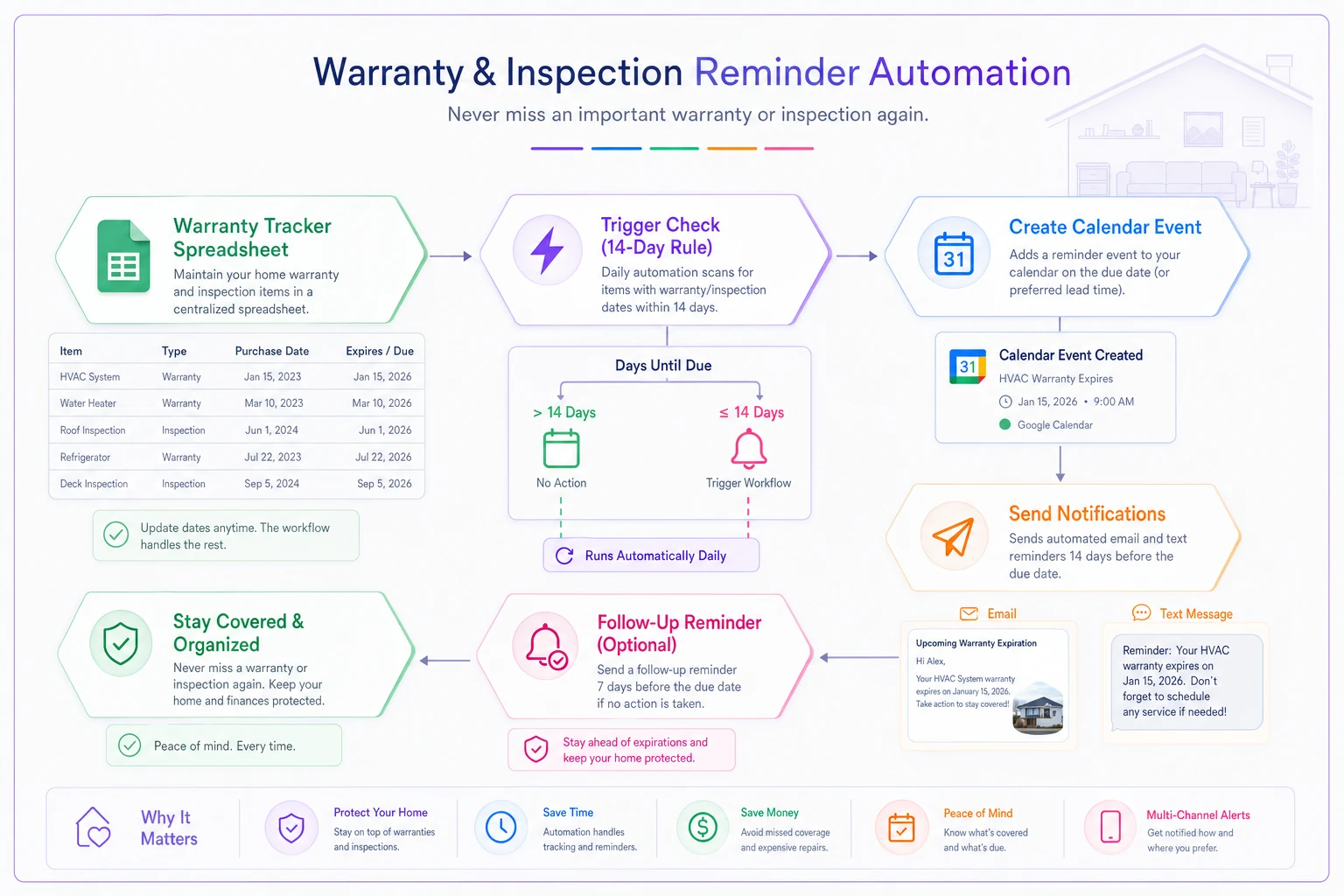
Schedule the Apps Script with a daily time-driven trigger so you get nudges before warranties lapse.
You get a nudge before a warranty lapses — which matters because a repair that's $0 under warranty completely changes the math. Plenty of households discover coverage expired a few weeks after they paid out of pocket. That's the single most avoidable loss in this whole area.
A recommended inspection and reminder schedule
Running the calculator is reactive. A light inspection cadence is what feeds it good data and catches problems while repairs are still small.
-
Monthly Quick look and listen for anything running loud, leaking, or short-cycling.
-
Quarterly HVAC filter swap, check water heater for sediment sounds or drips, test garbage disposal and dishwasher drainage.
-
Twice a year Clean fridge coils, run the washer's cleaning cycle, inspect visible plumbing connections.
-
Annually Professional HVAC service, water heater flush, and a full pass through your spreadsheet to update ages and re-run recommendations.
-
At every repair Log the date, cost, and what failed. Three logged repairs on one item is an automatic "run the replace math" trigger.
That last point is the quiet backbone of the whole system. Repair history is what turns a one-off decision into a pattern you can actually see. A fridge with one repair in eight years is healthy. A fridge with its third repair in two years is telling you something, and the log makes that impossible to ignore. Without the log, you're back to arguing from memory — which is exactly the problem this whole setup is trying to fix.
When the math says one thing but you should do another
The formulas handle money. They don't handle everything.
When to repair even if "REPLACE" shows up:
-
The item is genuinely hard to replace right now (backordered, mid-renovation, bad time of year for installers).
-
The failure is cosmetic or minor and the core unit is otherwise sound.
-
You're moving within a year — let the next situation absorb the replacement.
When to replace even if "REPAIR" shows up:
-
It's a safety issue — gas, electrical, water heater pressure, anything that could fail dangerously.
-
The repair relies on a part that's discontinued or on long backorder (see below).
-
You've already repaired it twice this year, even if each fix was cheap.
Who should skip the spreadsheet entirely: if you rent, or if the item costs under $150 to replace, the analysis takes more time than the decision is worth. This system earns its keep on appliances and equipment running $600 and up.
Parts, obsolescence, and the trap of a "cheap" repair
A repair quote assumes the part exists and will keep existing. For anything older than about 8 years, that assumption gets shaky. Manufacturers typically stock parts for 7–10 years after a model is discontinued, and some control boards and compressors go scarce well before that.
Before approving a repair on an older unit, ask the tech one question: is this part current, or is it getting hard to find? If the answer is "we had to order it from a third party" or "this is the last one in the region," treat that as a strong nudge toward replacement — not because of this repair, but because the next one may be impossible or absurdly expensive. A fully functional appliance with an unavailable control board is just a heavy decoration.
Add a column to your sheet: parts risk (Low/Med/High). Flip any REPAIR — review to REPLACE when parts risk is High. It's a cheap input that prevents the worst outcome in this whole category — paying for a repair on something that becomes unfixable six months later.
A quick note on data privacy
If you're logging appliance serial numbers, purchase records, warranty accounts, and vendor contacts in a shared sheet, that's a small pile of sensitive data. A few sensible habits:
-
Keep serial numbers and warranty-account logins out of the same document — split them, so one leaked file isn't a full identity kit.
-
If you use automation connectors, give them access to a copy or a single dedicated sheet, not your entire Drive.
-
Share the sheet with specific people, not "anyone with the link."
-
Strip financial account numbers out of repair notes before sharing with a contractor.
None of this is paranoia — it's just not leaving your warranty accounts and purchase history sitting in a public link because it was convenient once.
The bottom of it
The repair-vs-replace question feels like a judgment call every time, which is exactly why it drains so much energy and so often gets decided wrong. It isn't really a judgment call.
It's four inputs — repair cost, replacement price, age, and lifespan — run through a ratio and a cost-per-year comparison, with energy savings and parts availability as tiebreakers. Build the sheet once, log repairs as they happen, and wire up a reminder so warranties never expire unnoticed. After that, the next leaking dishwasher doesn't start an argument. It fills in five cells and tells you what to do.
It fills in five cells and tells you what to do.
Ready to simplify your household management?
Join thousands of families using Famioly to save time, reduce home management stress, and keep the household running smoothly.