


Most family organizer roundups fall apart the second you have more than one kid. The app looks great in the demo, then you hit a wall: only two profiles on the free tier, no way to assign a recurring Tuesday-and-Thursday chore to a specific kid, and absolutely no clue what to do when your 14-year-old owes you $7 from a shared pizza night.
So this isn't a list of every app that exists. It's a shortlist built around three jobs that busy households actually need handled together: assignable chores, a shared calendar, and basic expense tracking. For each pick I'll give you pricing, where it runs, what it does well when you've got several kids, and — more importantly — where it quietly falls short once the family gets bigger.
One thing up front: no single app nails all three jobs. That's why half this list is pairings. Chasing one tool that does everything usually means doing all three things poorly. The households that stay organized tend to pick one strong "hub" and bolt on a second tool for the thing the hub is bad at.
How I'm judging these (so the picks make sense)
Before the list, here's the filter. A family organizer app with budget tracking has to clear these for a multi-kid home:
-
Profiles that scale. Four, five, six people without a paywall surprise.
-
Recurring, assignable chores — not just a shared to-do list everyone ignores.
-
A calendar you can actually sync with Google/Apple and, ideally, feed school schedules into.
-
Expense tracking that handles "who owes whom," not just a category pie chart.
-
Parental controls that let kids see their stuff without editing yours.
The recurring failure point across almost all of these is the money piece. Chores and calendars are largely solved problems. Splitting a $60 grocery run between two parents, or tracking that three kids each earned different allowances this week, is where most apps wave their hands and call it done.
The 6 picks at a glance
Now the detail that actually helps you choose.
Stop losing track of household duties.
Famioly helps you organize, assign & complete family tasks efficiently.
- Centralized task management
- Shared family calendar
- Budget & expense tracking
No credit card required
| Solution | Type | Free tier | Paid | Platforms | Best for | Biggest weakness |
|---|---|---|---|---|---|---|
| Cozi | Standalone | Yes (ad-supported) | ~$30/yr Gold | iOS, Android, Web | Big families, shared calendar | Weak on money + chore detail |
| Greenlight | Standalone | No (card-based) | ~$5–15/mo | iOS, Android | Allowance + real money for kids | Not a calendar tool |
| OurHome | Standalone | Yes | Limited paid | iOS, Android | Free assignable chores + points | Dated UI, no expense splitting |
| Google Calendar + Splitwise | Pairing | Yes | Optional | iOS, Android, Web | Tech-comfortable families | Two apps to manage |
| FamCal + Greenlight | Pairing | Partial | ~$5–15/mo (Greenlight) | iOS, Android | Calendar + allowance combo | Overlap, some double-entry |
| Picniic | Standalone | Limited | ~$8/mo | iOS, Android, Web | All-in-one hub attempt | Pricey, uneven features |
Now the detail that actually helps you choose.
1. Cozi — the default family calendar that survives five schedules
Cozi is where most big families land, and honestly for good reason: the shared color-coded calendar handles a lot of people without choking. Each family member gets a color, and the agenda view stays readable when you've got soccer, band, two dentist appointments, and a birthday party stacked on one Saturday.
Pricing: Free with ads; Cozi Gold runs around $30/year and strips ads, adds reminders, and unlocks a few extra views.
Platforms: iOS, Android, and a real web app — which matters more than people expect. Entering a whole season of practice times on a phone is miserable.
-
No hard profile cap — add the whole crew plus grandparents if you want.
-
Shared shopping and to-do lists everyone can edit.
-
The calendar genuinely scales past the two-kid mark.
Where it falls short:
-
Chores exist as list items, but there's no real assignment engine — no points, no recurring "every Tuesday for Jake only," no completion tracking that actually holds kids accountable.
-
No expense tracking worth mentioning. This is the gap. Cozi is a calendar-first tool wearing an organizer costume.
Verdict: Fantastic hub, bad wallet. Cozi is almost always half of a pairing, not a complete answer.
2. Greenlight — the money half most families are actually missing
Greenlight isn't a calendar app and doesn't pretend to be. It's a debit card and allowance system for kids, and it solves the single hardest part of this whole category: tracking money per-kid in a way that actually teaches something.
Pricing: No free tier — plans run roughly $5–15/month depending on tier, covering up to five kids on one plan.
Platforms: iOS and Android. No meaningful web experience, which is a minor annoyance if you're a desktop person.
-
Separate balances, spend, save, and give buckets per kid.
-
Chore-to-allowance automation — mark a chore done, the allowance moves.
-
Parents see every transaction; kids only see their own.
Where it falls short:
-
It's money only. No shared calendar, no household task board for non-paid chores.
-
The per-kid cost adds up, and the card system is overkill for a 6-year-old who just needs a sticker chart.
If allowance and real spending are the pain point, this is the piece you're missing. Pair it with a solid calendar and you've covered two of three jobs cleanly. For families juggling this while managing care gaps, having the money side automated removes one more moving part — the budget pressures that come with that are covered in our childcare waitlist household playbook.
3. OurHome — the free chore engine for younger households
OurHome is what I point budget-conscious families toward when kids are too young for debit cards but old enough to earn points. It's a legitimate chore-assignment system, free, with recurring tasks and a points-reward loop that actually works for younger kids.
Pricing: Free for core features; limited paid extras.
Platforms: iOS and Android.
-
Assign recurring chores to specific kids with due times.
-
Points convert to rewards you define — screen time, allowance, whatever.
-
Shared calendar and grocery list are bundled in.
Where it falls short:
-
The interface feels dated, and syncing can lag.
-
No real expense splitting or budget tracking — points aren't dollars.
-
School calendar sync is clunky at best.
Verdict: Best free option for the chores-and-points crowd with kids roughly ages 5–12. It stops being enough once teens want actual money management.
4. Google Calendar + Splitwise — the best-of-breed pairing for tech-comfortable families
This is my pick for households that don't mind running two apps and want each one to be genuinely excellent. Google Calendar handles scheduling better than any purpose-built family app, and Splitwise is the cleanest expense-splitting tool on the market.
Pricing: Both free at the level most families need. Splitwise Pro is optional.
Platforms: Everything — iOS, Android, web, and deep integration with whatever you already use.
How the workflow runs:
-
Create a shared Google Calendar per kid, color-coded, each subscribable.
-
Sync school calendars directly — most districts publish iCal feeds Google ingests natively. This is the one thing dedicated family apps consistently can't do.
-
Use Splitwise for every shared cost
groceries, co-parent expense splits, the teen who owes you from last weekend.
-
Settle up on a cadence — weekly or monthly — instead of chasing $7 here and there.
-
Unlimited calendars, flawless sync, real school-feed support.
-
Splitwise handles co-parent and kid IOUs without turning into a spreadsheet.
Where it falls short:
-
No built-in chore engine — you'd need a third tool or use Google Tasks loosely.
-
Two apps means two logins and a bit more setup discipline.
Who should skip this: Anyone who finds managing two separate apps stressful. For them, an all-in-one is worth the feature compromises.
5. FamCal + Greenlight — calendar warmth plus real allowance muscle
FamCal is a friendlier, more "family-shaped" calendar than raw Google Calendar — shared lists and notes are built in and feel intentional. Pair it with Greenlight and you get a warm shared calendar plus the strongest allowance system on this list.
Pricing: FamCal has a usable free tier; Greenlight is the ~$5–15/month piece.
Platforms: Both iOS and Android.
-
FamCal's shared notes and lists feel designed for parents, not engineers.
-
Greenlight carries the money load completely.
Where it falls short:
-
Some feature overlap — both have reminder systems, so you'll pick one and ignore the other.
-
School-calendar sync in FamCal is weaker than Google's native feeds.
-
A little double-entry creeps in if you're not disciplined about which app owns what.
Verdict: Good middle path for families who want something friendlier than Google but still need serious allowance tracking.
6. Picniic — the all-in-one attempt for integration-first families
Picniic tries to do everything in one dashboard: calendar, to-dos, locator, shopping, meal planning, a document locker. For families who genuinely won't run two apps, it's the most complete single-app option on this list.
Pricing: Limited free tier; premium around $8/month.
Platforms: iOS, Android, web.
-
One hub for calendar, lists, and family info.
-
Decent profile support and parental visibility.
Where it falls short:
-
Expense features are shallow compared to Splitwise or Greenlight.
-
Feature quality is uneven — some modules feel half-finished.
-
At ~$8/month you're paying all-in-one prices for pieces that aren't quite best-in-class.
Verdict: Choose it only if "one app, one login" genuinely outweighs having the best tool for each job. For most multi-kid homes, a pairing still beats it.
A real scenario: the three-kid household that stopped losing track of money
A family of five — three kids ages 8, 11, and 15 — was running everything through a single shared calendar app with a built-in allowance feature. On paper it was tidy. In practice the money side quietly fell apart.
Every week there were small IOUs: the 15-year-old covered a movie and got reimbursed late, the 11-year-old's chore allowance didn't match what the app said, and the parents were splitting grocery and activity costs between two accounts with no running tally. Nothing huge individually — but somewhere around $40–70 a month was going untracked or getting forgotten, plus the weekly friction of "wait, did I pay you back?"
They switched to a pairing: Google Calendar for scheduling (with the middle schooler's school calendar synced directly, which killed the "I didn't know about the early release" problem) and Splitwise for every shared cost. Allowances moved to a weekly settle-up instead of running tabs.
The result wasn't dramatic — it rarely is with this stuff. Within a couple months the untracked money basically disappeared, the "you owe me" arguments dropped off, and the parents spent noticeably less mental energy reconstructing who paid for what. The fix wasn't a fancier app. It was using two focused tools instead of one tool pretending to do both jobs.
One-app vs. paired workflows
Go one-app if:
-
You have one or two kids.
-
Nobody in the house wants to manage multiple logins.
-
Your money needs are light — allowance, not co-parent splitting.
Go paired if:
-
You've got three or more kids, or you co-parent across households.
-
Expense splitting matters — reimbursements, shared costs, IOUs.
-
You want real school-calendar sync (strongly favors Google Calendar).
A workable paired setup for most busy families: one calendar hub + one money tool. Calendar hub carries schedules and chores; money tool carries allowance and splitting.
Don't make either app do the other's job — that's where these systems quietly fall apart over time.
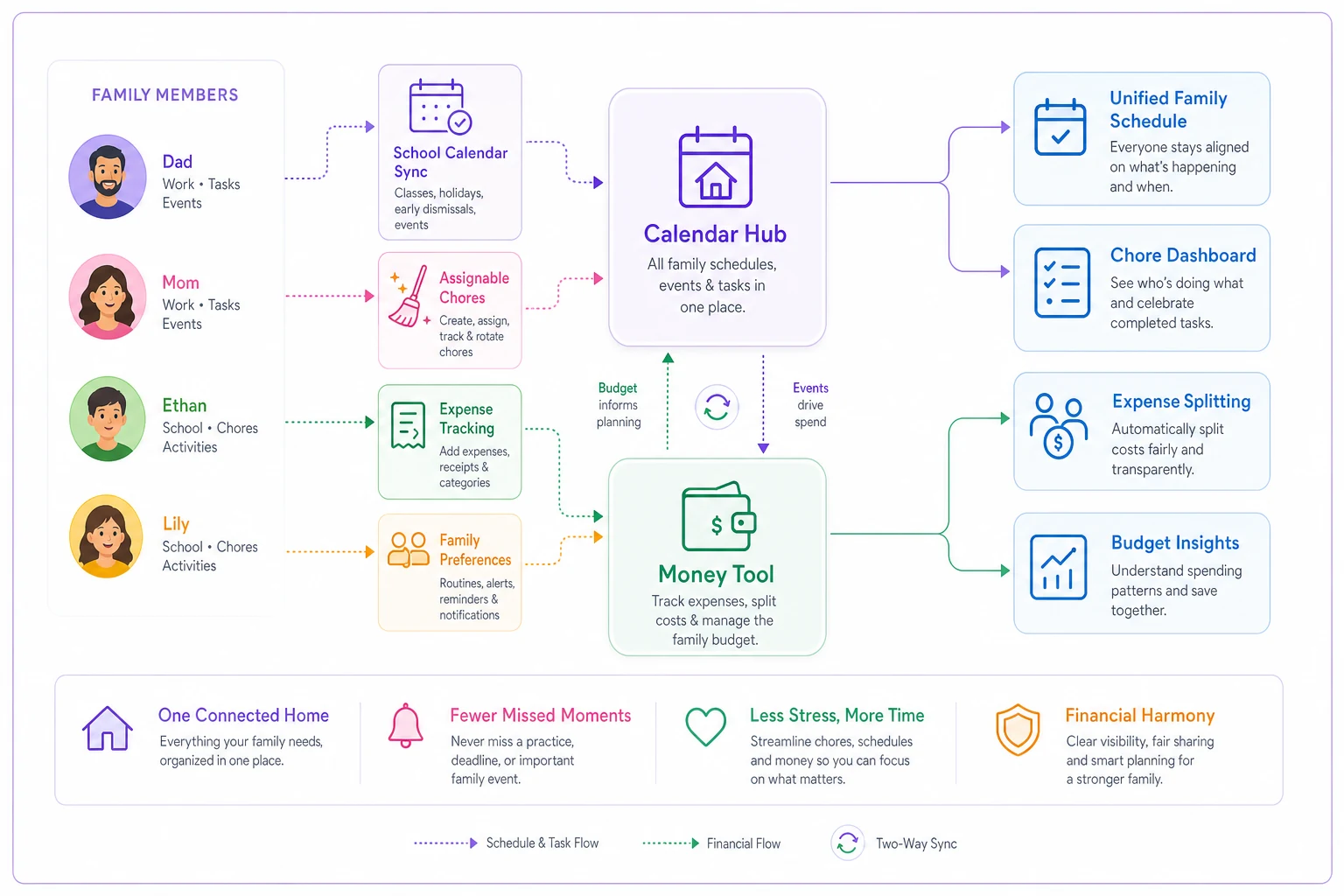
A simple visual of the two-tool workflow can make deciding which app does what much easier for busy parents.
Quick decision checklist
Run through these before you commit:
-
Family size? 1–2 kids → standalone is fine. 3+ → lean pairing.
-
Tech comfort? Low → Cozi or Picniic. High → Google Calendar + Splitwise.
-
Biggest pain — chores, calendar, or money? Solve that one first, then add.
-
Do kids need real money? Yes → Greenlight. Points are enough → OurHome.
-
Need school-calendar sync? Yes → you basically need Google Calendar in the mix.
-
Integrated or best-of-breed? Integrated → Picniic/Cozi. Best-of-breed → a pairing.
-
Co-parenting across two homes? Splitwise for money, shared Google Calendars per kid.
If school-calendar sync is a priority, test subscribing to your district's iCal feed in Google Calendar before committing to a paid family app.
Run through these before you commit:
Where this leaves you
The honest takeaway: a family organizer app with budget tracking that does all three jobs flawlessly doesn't really exist yet. Calendars are solved. Chores are solved. Money is where every app gets thin — which is exactly why the money tool is the one most worth choosing deliberately.
If you've got one or two kids and low tolerance for extra apps, pick Cozi or Picniic and accept the soft spots. If you've got a full house or you co-parent, build a pairing around a strong calendar and a real money tool and let each one do only what it's good at. That single decision, more than any feature list, is what keeps a busy household's system from falling apart three weeks after you set it up.
Ready to simplify your household management?
Join thousands of families using Famioly to save time, reduce home management stress, and keep the household running smoothly.