


Open your phone's photo app right now and search for your kid's last dentist invoice, or the receipt for the dishwasher you want to warranty-claim, or the one clear photo of your passport you swore you saved. If you found it in under 20 seconds, you can stop reading. Most people can't. They scroll, give up, and end up re-shooting or re-requesting the thing they already had.
The problem isn't storage. Everyone has infinite cloud storage now. The problem is that families treat photos and documents like a single undifferentiated pile, and a pile with 14,000 items in it is functionally the same as having nothing — you can't retrieve on demand. The fix isn't a weekend reorganization project. Those never stick. It's a five-minute weekly habit with three moving parts: a naming convention, a few tagging rules, and retention logic that keeps the pile from growing back.
This is the whole system. Nothing fancy, nothing you need to install, and it's specifically built around how families actually generate and need documents.
Why the camera roll becomes unsearchable
A family phone captures three completely different kinds of images that all land in the same place: genuine photos (the birthday party), functional images (a photo of a permission slip, a receipt, a prescription label, the parking-lot section where you left the car), and throwaway images (the screenshot of an address you needed for 10 minutes). The functional ones are the ones you'll desperately need later, and they get buried fastest — because there are far fewer of them than vacation photos, and search can't reliably read handwriting or crumpled receipts.
The burial follows a predictable timeline. A photo of an orthodontist's treatment-plan quote is findable for about four days — you remember roughly when you took it. By week three it's gone. By the time you actually need it (insurance follow-up, HSA reimbursement, a dispute), you're scrolling March looking for something from January.
The second reason it breaks down is multiple capture devices. Two parents, maybe an older kid, each photographing different slices of the same situation. The warranty photo is on one phone. The receipt is on another. Neither knows the other took it. This is where most "I'll just search for it" strategies fall apart — the file exists, just not on the device you're holding.
The real cost, in time and money
The time cost is obvious and relentless: a few minutes per search, several searches a week, low-grade friction that never registers as a crisis but never stops either.
Stop losing track of household duties.
Famioly helps you organize, assign & complete family tasks efficiently.
- Centralized task management
- Shared family calendar
- Budget & expense tracking
No credit card required
The money cost is quieter. A family buys a dishwasher for around $800 with a two-year warranty. It fails at month 20. The manufacturer wants proof of purchase. The receipt was a photo taken in a parking lot, buried months ago, and the email confirmation is somewhere in an inbox with 40,000 unread messages. The claim stalls. They eat a repair that should have been covered.
Multiply that across smaller things: HSA reimbursements left unfiled because the receipt disappeared, a deposit paid twice because nobody could confirm the first one cleared, a medical record re-requested at $25 because the PDF was "somewhere." Across a year, retrieval failures quietly cost most families a few hundred dollars and a lot of unnecessary back-and-forth.
The naming convention (this is the whole trick)
You don't need a perfect taxonomy. You need a front-loaded file name that puts the most searchable word first. The pattern that holds up:
YYYY-MMPersonCategory_ShortDescription
-
2026-02MayaMedical_OrthoQuote
-
2026-01HouseWarranty_Dishwasher-Bosch
-
2026-03LeoSchool_FieldTripSlip
-
2026-02HouseholdTax_DaycareReceipt
Why this order works:
-
Date first means files sort chronologically without needing folders.
-
Person second is how families actually think ("where's Maya's stuff"), and it's the fastest filter when three kids generate overlapping paperwork.
-
Category third uses a small fixed vocabulary — pick 6–8 and don't add more casually.
The fixed category list matters more than anything else here. The moment you allow freeform categories, two people invent Medical, Health, and Doctor for the same thing and the whole thing breaks. Lock it to something like:
| Category | What goes in it | Typical retention |
|---|---|---|
| Medical | Quotes, prescriptions, test results, HSA receipts | 7 years (tax-linked) or permanent |
| School | Slips, report cards, enrollment forms | Until end of school year +1 |
| Warranty | Receipts + proof of purchase for anything >$150 | Length of warranty +3 months |
| Tax | Anything a return might reference | 7 years |
| Legal/ID | Passports, SSN cards, custody docs | Permanent |
| Home | Service records, manuals, paint colors | While you own the home |
| Receipts | General purchases you might return | 90 days then purge |
The retention column does real work. It tells you not just where things go but when they leave — which is the part almost everyone skips.
The 5-minute weekly habit, step by step
Pick a fixed slot. Sunday night works because the week's functional clutter is still fresh. Set a recurring reminder and keep it short — if it starts taking 20 minutes you'll quit by week four.
-
Open your camera roll and filter to the last 7 days. You're only touching new stuff. You are not fixing the historical backlog (more on that below).
-
Scan for functional images — receipts, permission slips, labels, quotes, anything that's a document and not a memory.
-
For each one, rename it using the convention and drop it into the right category folder or album. On most phones this is a share-to-Files move. Thirty seconds each, and there usually aren't many.
-
Delete the pure throwaways — the screenshotted address, the blurry duplicates, the parking-spot photo you don't need anymore.
-
Flag anything with a deadline or expiry so it gets a reminder attached, not just a filing.
Five items on a normal week, maybe fifteen after a busy stretch. The actual photos — the birthday party, the soccer game — you leave completely alone. They don't need renaming; you'll find them by date and face anyway.
Quick visual of the weekly 5-minute workflow.
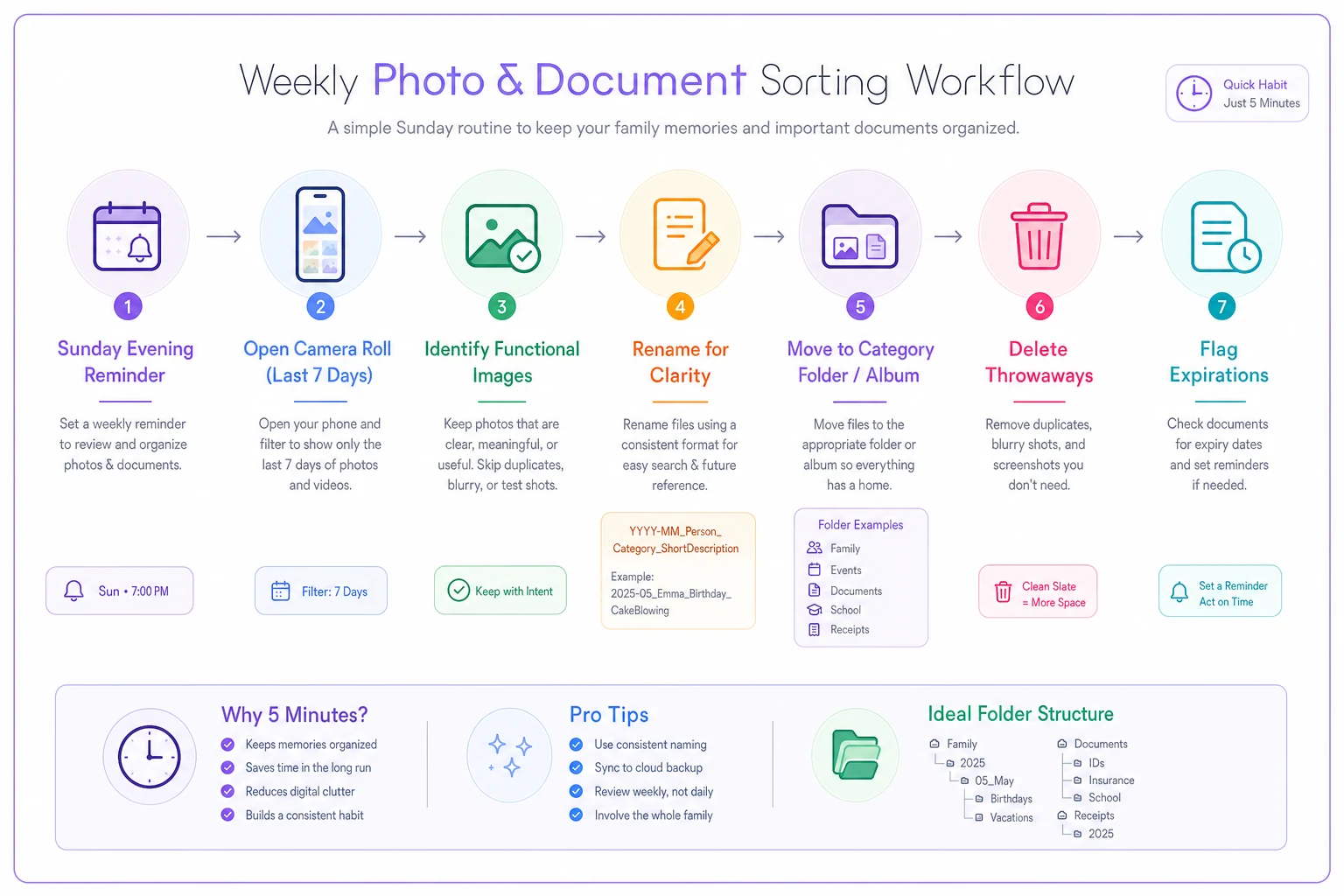
Put the recurring reminder on a shared family calendar so both parents can keep the habit.
The actual photos — the birthday party, the soccer game — you leave completely alone. They don't need renaming; you'll find them by date and face anyway.
The backlog question (and why you shouldn't touch it)
The instinct is to block off a Saturday and fix the entire history first. Don't. Backlog reorganization is where this habit goes to die — it's demoralizing, takes hours, and most of those old files you'll never need anyway.
Use a forward-only rule with a retrieve-and-file-on-contact exception instead:
-
From today forward, every new week gets the 5-minute treatment.
-
You never proactively touch anything older than the current week.
-
The one exception is when you actually need something from the backlog. When you finally dig up that January orthodontist quote, you rename and file it right then, the moment it's in your hand.
Over a year, the documents you actually use get cleaned up organically, and the ones you never needed stay untouched and harmless. This feels wrong to organized people and it's exactly right. You're spending effort only on documents that have proven they matter.
Quick-retrieval examples: what "good" looks like
HSA reimbursement season. Search Medical + the kid's name, filter by year. Every receipt is in date order. A filing that used to take an evening takes a few minutes.
-
HSA reimbursement season. Search
Medical+ the kid's name, filter by year. Every receipt is in date order. A filing that used to take an evening takes a few minutes. -
Warranty claim. The dishwasher dies at month 20. Search
Warranty Dishwasherand the receipt photo and model number come up immediately. Because you flagged the expiry date, you already knew you were inside the window. -
School re-enrollment. Search
School+ child + the year. Last year's forms are right there as a reference. -
"Did we pay that?" Search
ReceiptsorTaxfor the vendor name. Confirmed in seconds.
The common thread: because the most useful word is at the front of every file name, and the vocabulary stays small and consistent, search returns the right thing on the first try instead of surfacing 200 results you have to scroll through.
A real scenario, with numbers
A two-parent household with three kids — ages 6, 9, and 13 — was generating a steady stream of paperwork: medical forms, three sets of school documents, warranties on a constant rotation of appliances and electronics. Their camera roll was around 16,000 items across two phones. Retrieval was pure scrolling.
They started the Sunday-night habit. First month felt like nothing — maybe five items a week, a few minutes total. The shift showed up around month three, when a tablet that cost roughly $430 failed and the proof of purchase took about 15 seconds to produce. Replacement was approved without any back-and-forth.
Over the first year, they stopped re-requesting medical records (two avoided, around $25 each), filed every HSA receipt they were owed, and caught one near-double-payment on an activity deposit. It wasn't a dramatic transformation. It was more that a slow, ignorable leak quietly stopped. The weekly five minutes replaced a real but hard-to-measure amount of monthly scrolling and a few hundred dollars a year in avoidable losses.
When this makes sense — and when it doesn't
Worth doing if your household generates functional documents regularly: kids in school, anyone managing ongoing medical care, a house with appliances and service history, anything tax-linked like childcare receipts. The more capture devices in the home, the bigger the payoff — the convention is what lets two phones feed one findable system.
Probably overkill if you're a single person with light paperwork and a good memory for where things are. If you reliably find documents today, a rigid naming convention is just friction you don't need.
Skip the forward-only rule if you have an upcoming event where historical documents matter now — a move, a divorce proceeding, a major insurance claim. In that case, do one targeted pass on that specific category only, not the whole roll.
The failure mode to watch for isn't doing it wrong — it's doing it too elaborately. People add a ninth category, start sub-tagging by month, invent a color system. Every addition is another way for two people to file the same thing differently, and inconsistency is the only thing that actually kills search. Keep the vocabulary small, keep the slot to five minutes, and let the retention rules handle the pruning. A simple system you run every week beats a perfect one you abandon in March.
Bottom line
Good photo and document habits for families aren't about tidiness. They're about being able to produce the right file in the 20-second window when it actually matters — the warranty claim, the reimbursement deadline, the "did we already pay this." A date-first naming convention, a locked set of 6–8 categories, retention rules that say when things leave, and a forward-only five-minute weekly pass is the entire system.
Start this Sunday, touch only the last seven days, and let the backlog clean itself up one document at a time as real life pulls each one back into your hands.
Good photo and document habits for families aren't about tidiness. They're about being able to produce the right file in the 20-second window when it actually matters — the warranty claim, the reimbursement deadline, the "did we already pay this." A date-first naming convention, a locked set of 6–8 categories, retention rules that say when things leave, and a forward-only five-minute weekly pass is the entire system. Start this Sunday, touch only the last seven days, and let the backlog clean itself up one document at a time as real life pulls each one back into your hands.
Ready to simplify your household management?
Join thousands of families using Famioly to save time, reduce home management stress, and keep the household running smoothly.